Direct Answer: Run a YouTube channel as a business, with or without your face on camera: niche research, retention scripts, voiceover, thumbnails and titles, analytics, Shorts, monetisation, team SOPs, AI tools and the policies that protect a channel.
Tuition Fee
100% Free
Duration & Workload
~10 Hours
Curriculum Depth
12 Chapters · 48 Lessons
Credential Awarded
Verified Certificate
12Chapters
Course outline
See what YouTube automation honestly means, compare faceless, presenter and team-run channel models, set realistic expectations about time, cost and risk, and set up a secure Google account, channel and YouTube Studio.
What YouTube Automation Really Means12 min
Faceless, Presenter and Team-Run Channel Models13 min
Realistic Timelines, Costs and Risks14 min
Setting Up Your Google Account, Channel and Studio13 min
Learn the main places viewers find videos, the viewer signals YouTube's recommendation system pays attention to, why new uploads are shown to small groups first, and which popular algorithm beliefs are myths.
Search, Browse, Suggested and Shorts Feeds13 min
Viewer Signals: Clicks, Watch Time and Satisfaction14 min
Why New Channels Get Tested on Small Audiences13 min
Myths About the Algorithm and What Gets Demoted14 min
Choose a niche by weighing viewer demand, competition and your own advantage, find proven topics through outlier videos, describe the exact viewer you serve, and decide whether to publish in Urdu, English or both.
Choosing a Niche: Demand, Competition and Your Edge14 min
Finding Outlier Videos and Proven Topics14 min
Building a Viewer Profile and Content Angle13 min
Language Choices: Urdu, English or Both13 min
Give the channel a clear name, handle and position, design a banner and profile picture that work on small screens, set up the trailer, About section and playlists, and plan content pillars and series that bring viewers back.
Channel Name, Handle and Positioning13 min
Banner, Profile Picture and Visual Identity13 min
Channel Trailer, About Section and Playlists13 min
Content Pillars and a Series Format Viewers Return To14 min
Research and fact-check before writing, open each video with a promise you keep, structure the script with open loops and steady pacing, and write lines that sound natural when spoken aloud.
Research and Fact-Checking Before You Write13 min
Openings That Promise and Deliver13 min
Story Structure, Open Loops and Pacing in a Script14 min
Writing for the Ear: Script Style for Voiceover12 min
Record clean narration at home, hire and direct voice artists with clear briefs, judge AI voices on quality and licence terms, and disclose synthetic or altered content the way YouTube requires.
Recording Your Own Voice at Home13 min
Hiring and Directing Voice Artists12 min
AI Voices: Quality, Licences and Limits13 min
Disclosure of Synthetic Voices and Altered Content14 min
Pick a faceless visual style you can sustain, license every clip, song and font properly, brief editors with clear references, and run review rounds and file handover so quality holds as the channel grows.
Faceless Visual Styles: Stock, Animation, Screen Recording and B-Roll13 min
Licensed Stock Footage, Music and Fonts13 min
Writing Edit Briefs and Reference Timelines12 min
Review Rounds, Quality Checklists and File Handover12 min
Understand what click-through rate measures and what it does not, design thumbnails that read instantly on a phone, write honest titles that still earn the click, and test packaging with YouTube's Test and Compare feature.
How Click-Through Rate Works on YouTube12 min
Thumbnail Design Principles That Read on a Phone13 min
Writing Titles That Earn the Click Honestly13 min
Testing Thumbnails and Titles With Test & Compare12 min
Help viewers find each video through search and recommendations by researching the words they use, writing useful descriptions, chapters and captions, translating metadata for wider audiences, and setting every upload option correctly before you publish.
Keyword Research for YouTube Search13 min
Descriptions, Tags, Chapters and Hashtags12 min
Captions, Subtitles and Translated Metadata12 min
Upload Settings, Scheduling and End Screens13 min
Read YouTube Studio analytics with purpose: find where viewers come from and where they leave, separate returning viewers from new ones, and run a monthly review that turns the numbers into a clear list of what to make next.
Reading YouTube Studio: Reach, Engagement and Audience Tabs13 min
Audience Retention Graphs and Where Viewers Leave14 min
Traffic Sources and Returning Viewers13 min
A Monthly Review That Decides the Next Videos14 min
Use Shorts to support long videos rather than replace them, understand how the YouTube Partner Program reviews channels, keep videos advertiser friendly, and plan other income such as memberships, sponsorships and affiliates while getting paid correctly in Pakistan.
Shorts Strategy Alongside Long Videos13 min
The YouTube Partner Program: Eligibility and Review14 min
Ad Revenue, Advertiser-Friendly Guidelines and Yellow Icons13 min
Memberships, Sponsorships, Affiliates and Getting Paid in Pakistan14 min
Run a channel through a small team with clear roles and written SOPs, hire and pay freelancers fairly, use AI tools to speed up work without mass producing content, and protect the channel from reused content problems, copyright strikes, Content ID claims and account takeovers.
Roles in a Channel Team and Writing SOPs13 min
Hiring, Paying and Managing Freelancers14 min
AI Tools Across the Workflow Without Mass-Producing Content13 min
Reused Content, Copyright Strikes, Content ID and Protecting the Channel14 min
Final exam & certificate
01
Topic checks
Each one opens the next topic
02
Chapter quizzes
Each one opens the next chapter
03
50-question final
50 of 100 marks to pass
04
Certificate
Issued instantly, verifiable
One attempt, 60 minutes. If you don't pass, you can retake once after 30 days.
The course guide
How to start a faceless YouTube channel, step by step
16 October 2026 · 9 min read
To start a faceless YouTube channel, pick a niche where real viewers have a question you can answer better than the channels already there, write original scripts that keep people watching, record a clear voiceover, pair it with visuals you are licensed to use, and publish on a schedule you can keep for months. The face is optional. Original value is not. Most faceless channels that fail do so because they reuse other people's material or chase a "passive income" promise, not because nobody is on camera.
This guide covers the decisions in the order they come up, the mistakes that get channels rejected for monetisation, and what our free YouTube Automation & Faceless Channels course teaches chapter by chapter.
What "faceless" and "automation" actually mean
A faceless channel is one where the creator does not appear on screen; narration, screen recordings, animation or licensed footage carry the video. "YouTube automation" sounds like software, but very little of a good channel is automated. What changes is who does the work and how predictable it becomes.
Task
Owner doing everything
A team-run, "automated" channel
Choosing topics
Gut feeling
A research sheet plus analytics
Scripts
Owner writes
Freelance writer works from a brief
Voiceover
Owner records
Owner, hired voice artist, or a disclosed AI voice
Editing
Owner cuts every clip
Editor follows a style guide and review checklist
Thumbnails
Owner designs
Designer, with owner approving the final one
The owner's job shifts to decisions and quality checks.
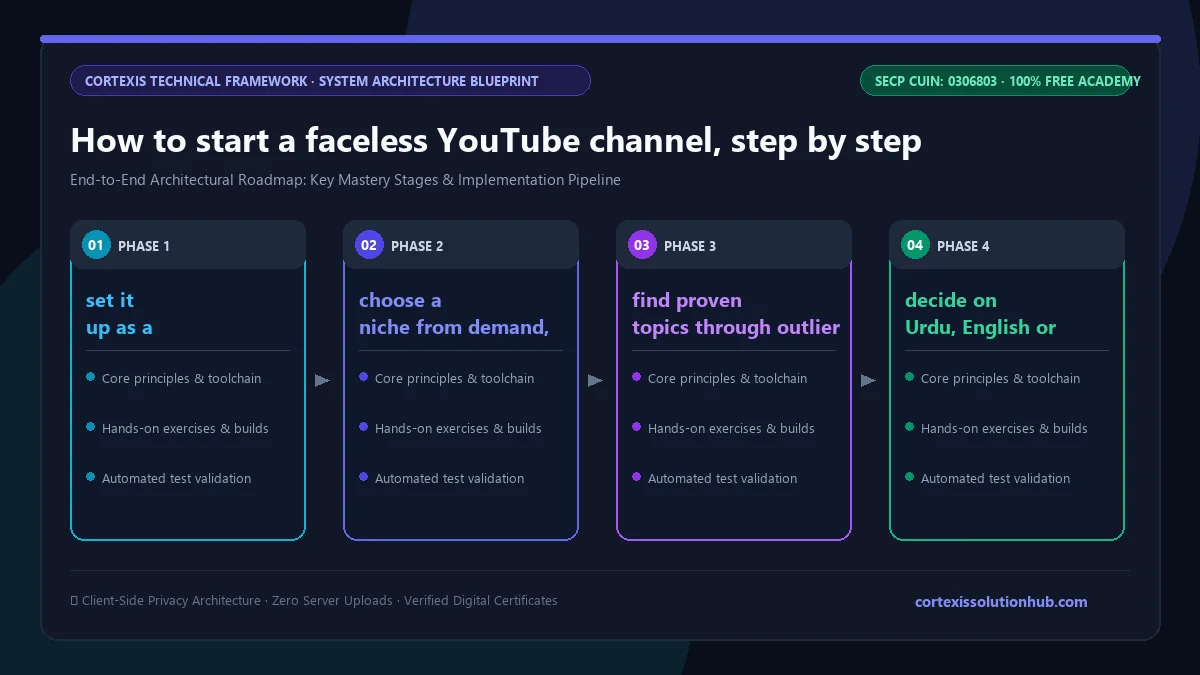
Figure 1: Complete step-by-step architectural workflow and technical execution stages for How to start a faceless YouTube channel, step by step.
How to start a faceless YouTube channel in 8 steps
Step 1: set it up as a small business, safely
Use a Google account you control, turn on 2-Step Verification and keep backup codes offline. Add editors through YouTube Studio permissions, never by sharing your password. Treat "sponsorship" emails with attachments as suspicious until you verify the sender. Decide in advance how much time and money you will put in before reviewing, and set goals around effort you control, not subscriber counts.
Step 2: choose a niche from demand, competition and your edge
A good niche has real viewer demand, competition you can match, and an edge you bring: knowledge (a pharmacist explaining medicines simply in Urdu, with clear limits), language, or skill level. Narrow beats broad. "Excel for accountants" gives a clear viewer and a reason to return. If a topic has almost no videos, the likely reason is little demand, not a hidden gold mine.
Step 3: find proven topics through outlier videos
Look for videos that got far more views than their channel normally gets. Take the underlying appeal and build your own research and angle. Never re-voice someone's video or copy its script with a few words changed. Treat third party view and earnings estimates as direction, not facts.
Step 4: decide on Urdu, English or both
Check autocomplete in English, Roman Urdu and Urdu script, since viewers in Pakistan search in all three. Pick one main language you can sustain, then review with real data.
Step 5: write scripts for retention, not just information
Fact-check before you write. Open with a promise and keep it. Use open loops, raising a question and answering it later, and write for the ear: short sentences and words you would actually say.
Step 6: produce the voiceover and visuals
Record yourself at home, hire a voice artist with a clear brief, or use an AI voice whose licence allows commercial use. YouTube requires you to disclose realistic altered or synthetic content when you upload. Pick a visual style you can sustain every week, and license every clip, song and font. Giving credit does not make a clip legal, and neither does keeping it under ten seconds.
Step 7: package and publish properly
Design thumbnails that read instantly on a phone and titles that earn the click honestly; overpromising wins clicks and loses viewers in the first minute. Test packaging with Test & Compare where available. Write useful descriptions, chapters and captions. Tags play only a minor role.
Step 8: read analytics monthly and decide the next videos
Watch impressions, click-through rate, retention graphs and traffic sources. New videos are tested on small audiences first, so early percentages swing. Never delete and re-upload a slow video; improve its packaging instead. Once a month, turn the numbers into a short list of what to make next.
Monetisation: what you need to know before you start
The YouTube Partner Program (YPP) is how channels earn from ads and memberships. Joining is not automatic at a number; people review channels against YouTube's policies. Thresholds have changed over the years, so check the YPP overview in the Help Center and the Earn section of Studio. You also need no active Community Guidelines strikes, 2-Step Verification and a linked AdSense account.
The rule that sinks most faceless channels is the reused content policy. It asks whether you add meaningful original value to material from elsewhere. High risk formats include:
compilations of other people's clips
reading other creators' articles aloud
slideshows of found images with background music
lightly edited re-uploads of dramas, films or cricket broadcasts
Lower risk formats are built on original research, scripts, visuals and analysis, with any third party clips licensed or short and genuinely discussed.
In Pakistan, YouTube pays through AdSense: verify your identity and address, submit US tax information, and add a bank account with its SWIFT code and IBAN, using your name exactly as on your CNIC. Sponsorships, affiliates and memberships are other income streams; disclose paid promotions clearly.
Common mistakes to avoid
Buying views or subscribers. It can lead to rejection and penalties.
Copying a channel line by line. Copycats and low effort drift are the biggest faceless risks.
Hiring a team before the format works. Get a repeatable process and some proof first.
Disputing a Content ID claim without a valid reason. It can escalate to a strike; three active strikes can end a channel.
Trusting a number from an old video. The YouTube Help Center is the source.
What automation honestly means, faceless vs presenter vs team-run models, realistic timelines and costs, secure account and Studio setup
2. How YouTube Recommends Videos
Search, browse, suggested and Shorts feeds, viewer signals, why new channels are tested on small audiences, algorithm myths
3. Niche and Audience Research
Demand, competition and your edge, outlier videos, a viewer profile, Urdu vs English
4. Building the Channel Brand
Name, handle and positioning, banner and profile picture, trailer and playlists, content pillars and series
5. Scripting and Storytelling for Retention
Research and fact-checking, openings that deliver, structure and pacing, writing for the ear
6. Voiceover: Human and AI
Recording at home, hiring voice artists, AI voice quality and licences, disclosure
7. Visuals and the Editing Pipeline
Faceless visual styles, licensing footage and music, edit briefs, review rounds and handover
8. Thumbnails and Titles
How click-through rate works, phone-readable thumbnails, honest titles, Test & Compare
9. YouTube SEO and Publishing
Keyword research, descriptions and chapters, captions and translated metadata, upload settings and end screens
10. Analytics and Growth Decisions
Reach and engagement tabs, retention graphs, traffic sources and returning viewers, a monthly review
11. Shorts and Monetisation
Shorts alongside long videos, YPP eligibility, advertiser friendly guidelines, other income and getting paid in Pakistan
12. Teams, AI Tools and Channel Safety
Roles and SOPs, hiring and paying freelancers, AI tools without mass production, copyright, Content ID and account protection
Each lesson ends with a short quiz you pass before the next unlocks. The course never promises income.
Who it is for and how long it takes
It suits students, freelancers and business owners who want a channel without being on camera. No editing experience is needed, though our video editing and short-form course helps if you cut your own videos, and AI Tools for Everyone goes deeper on AI for research and drafts. The course is planned for about six weeks; the channel itself needs months of consistent uploads before you judge a niche.
How the free certificate works
After you complete every lesson and pass every chapter quiz, the final exam opens: 50 questions, 60 minutes, and a pass mark of 50 out of 100. You get one timed attempt. If you do not pass, a retake opens 30 days later with the questions in a new order and the options shuffled. Leaving the page submits the exam, so pick a quiet hour. Pass, and the certificate is issued free.
It is not a YouTube or Google certification. For freelance channel management, a channel you grew is stronger proof; see how to start freelancing in Pakistan.
Questions, answered
06 questions
Yes. YouTube does not require a face on screen. It reviews whether the channel follows its monetisation policies, including reused content rules. Original scripts, narration and visuals can qualify; other people's clips usually cannot.
Yes, if the tool's licence allows commercial use and the quality holds viewers. Disclose realistic synthetic or altered content when you upload, following YouTube's current rules.
You can start with a basic microphone, free editing software and the YouTube Audio Library. Costs rise when you hire writers, voice artists or editors; collect current quotes and set a spending limit in advance.
There is no fixed timeline, and anyone who promises one is selling something. Expect months of consistent work, and check the current YPP thresholds in the Help Center.
For most faceless channels, long videos are the core and Shorts support them, cut from material you already have. Judge Shorts on subscribers and long video views, not views alone.
Usually not without a licence. Such clips attract Content ID claims and takedowns, and channels built on them face reused content problems. License the footage or pick a different format.
Ready to build it properly? Start the free [YouTube Automation & Faceless Channels course](/learn/youtube-automation) and set up your channel the way that lasts.