Direct Answer: Learn Python the way it is actually written — types and comprehensions, classes and dunder methods, packaging, real HTTP clients, and a test suite that proves the whole thing works.
Tuition Fee
100% Free
Duration & Workload
~11 Hours
Curriculum Depth
12 Chapters · 48 Lessons
Credential Awarded
Verified Certificate
12Chapters
Course outline
Values and types, control flow that reads like English, and the comprehensions Python leans on everywhere.
Values, Names, and Types13 min
Control Flow That Reads Like English12 min
Comprehensions and Choosing a Container14 min
Unpacking and Multiple Assignment13 min
Interfaces other people can call, the scoping rules behind the classic bugs, and how to organise and isolate a project.
Functions, Arguments, and Defaults13 min
Scope, Closures, and Decorators12 min
Modules, Packages, and Virtual Environments13 min
Generators and the yield Statement13 min
Bundling state with behaviour, hooking into Python syntax, and knowing when not to write a class at all.
Classes, Instances, and Attributes12 min
Dunder Methods and Dataclasses13 min
Inheritance, Composition, and Duck Typing13 min
Enums for Fixed Sets of Values12 min
Reading and writing data without losing it, moving it in and out of JSON, and handling errors so they surface instead of hiding.
Files, Paths, and the with Statement12 min
JSON and Data Interchange12 min
Errors and Exceptions13 min
Cleanup You Can Trust with contextlib13 min
The batteries Python ships with, calling real APIs with requests, and proving your code works with pytest.
Standard Library Highlights13 min
Talking to HTTP APIs with requests14 min
Testing with pytest14 min
Local Data with sqlite313 min
Finding the slow line before you rewrite it, choosing between threads, processes, and asyncio, and the failure modes each one brings.
Measure Before You Optimise13 min
Threads, Processes, and the GIL14 min
asyncio for I/O at Scale14 min
Queues, Backpressure, and Worker Pipelines13 min
Type hints a checker can actually verify, a project other people can install, and the configuration, logging, and CI that keep it running once it leaves your laptop.
Static Typing with mypy13 min
Packaging, Configuration, and Secrets13 min
Logging, CI, and Running in Production14 min
Versioning and Releasing a Package13 min
Fakes at the right boundary, generated inputs that find the cases nobody thought of, and the cure for a suite the team has stopped trusting.
Choosing the Boundary: Unit, Integration, and Contract Tests13 min
Fixtures, Fakes, and Freezing Time, Randomness, and the Network13 min
Property-Based Testing with Hypothesis14 min
Flaky Tests, Slow Suites, and Test Data at Scale14 min
Post mortem debugging, structured events, traces and live profilers that turn a vague production report into one specific line of code.
Post Mortem Debugging with pdb, Tracebacks, and faulthandler14 min
Structured Logs, Correlation IDs, and Sampling Under Load13 min
Metrics and Distributed Tracing with OpenTelemetry14 min
Live Diagnosis: py-spy, tracemalloc, and Memory Leaks14 min
The attribute and class machinery frameworks are built from, and how to expose it as an API other teams extend without you breaking them.
Attribute Access: Properties, Descriptors, and __slots__14 min
Protocols, ABCs, and Generics for Extensible Types14 min
__init_subclass__, Metaclasses, and Plugin Registries13 min
Designing a Public API and Deprecating It Safely13 min
Treating every input and every third party package as hostile, and hardening a Python service that real attackers will reach.
Threat Modelling a Python Service13 min
Injection at the Boundaries: Shell, SQL, Paths, and Templates13 min
Deserialisation, Sandboxing, and Code That Arrives as Data13 min
The Dependency Supply Chain: Auditing, Pinning, and Typosquats13 min
Where pure Python runs out, and how native code and the free threaded interpreter buy real speed without leaving the language behind.
Where Interpreter Time Goes: Bytecode, Objects, and Dynamism13 min
Calling Native Code: ctypes, cffi, and the Buffer Protocol13 min
Writing and Shipping an Extension with Rust and PyO314 min
Free-Threaded Python, Subinterpreters, and True Parallelism14 min
Final exam & certificate
01
Topic checks
Each one opens the next topic
02
Chapter quizzes
Each one opens the next chapter
03
50-question final
50 of 100 marks to pass
04
Certificate
Issued instantly, verifiable
One attempt, 60 minutes. If you don't pass, you can retake once after 30 days.
The course guide
How to learn Python for free: a step by step plan
16 October 2026 · 10 min read
You can learn Python for free with three things: the official installer from python.org, a plain code editor such as VS Code, and a structured course that makes you write code instead of watching it. Spend the first month on the core language (types, loops, functions, files), the second on small real projects, and only then move on to tests, packaging and the faster, harder parts. Nothing in that list costs money. What it costs is about an hour a day of typing, getting errors, and fixing them.
This guide gives you the order to learn things in, what to build at each stage, the mistakes that waste the most time, and an honest look at what our free Python Development course covers, chapter by chapter, so you can decide whether it fits you.
What you need before you start
You do not need a powerful laptop, a paid IDE or a maths background.
Python 3 from python.org. On Windows, if you use the classic installer, tick "Add python.exe to PATH". That one checkbox prevents the most common first day problem.
An editor. VS Code with the official Python extension is free and good enough for professional work.
A terminal you are not scared of. You will run python script.py and pip install constantly.
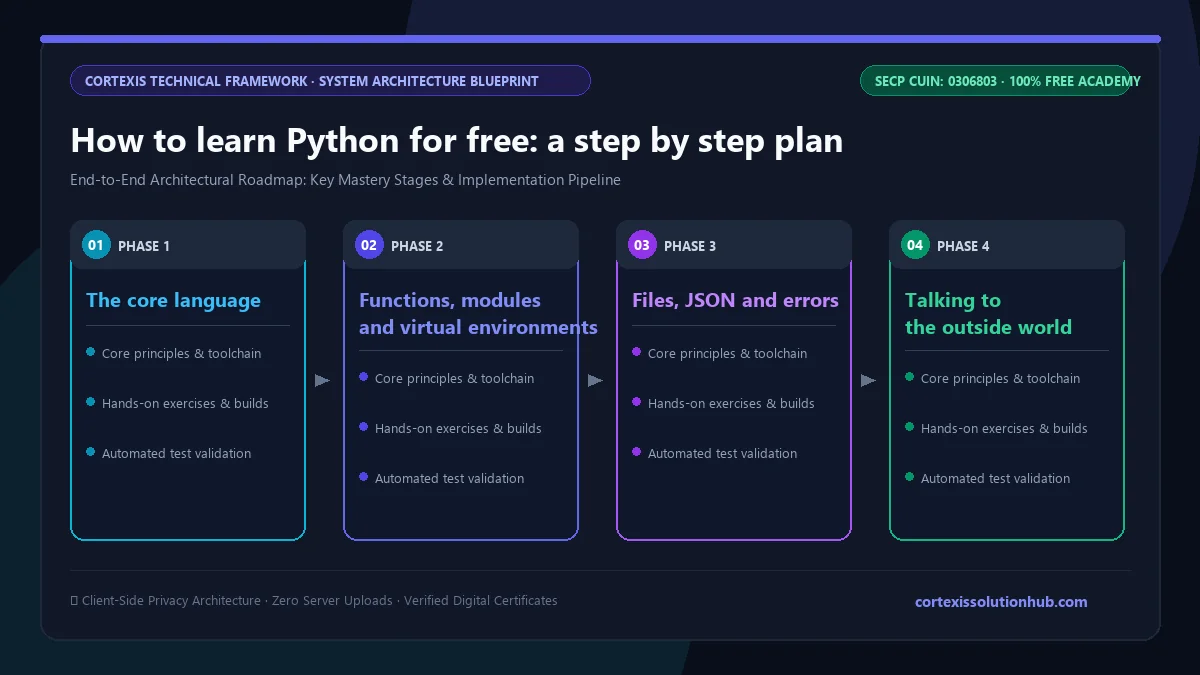
Figure 1: Complete step-by-step architectural workflow and technical execution stages for How to learn Python for free: a step by step plan.
How to learn Python for free, step by step
Here is the order that works, with the thing you should be able to build at the end of each stage. The time estimates assume roughly an hour a day, five or six days a week.
Stage
What to learn
Rough time
You can build
1. Core language
values and types, if, loops, lists, dicts, comprehensions
Two rules. Do not move on until you have built the stage's project without copying a tutorial. And do not skip stage 4: beginners rush past files and exceptions, then every project silently loses data the first time something goes wrong.
Stage by stage: what actually matters
The core language
The idea that unlocks most of Python is that a name is a label on a value, and assignment never copies. Write b = a with a list and change b, and a changes too. This explains most "why did my data change?" bugs, so learn it in week one.
Learn comprehensions early too: [x * 2 for x in marks if x > 50] is how Python developers actually build lists.
Functions, modules and virtual environments
Learn why def add(item, basket=[]) is a bug (the default list is created once and shared between calls) and how to fix it with None. Learn to make a virtual environment with python -m venv .venv for every project, so installing one package for one project never breaks another.
Files, JSON and errors
Real programs read and write files. Use pathlib for paths, always open files with with so they close even when something fails, and learn to catch the specific exception you expect instead of a bare except: that hides every mistake, including your own typos.
Talking to the outside world
This is where Python starts to feel useful. Calling a public API with the requests library, saving the results in a local sqlite3 database and writing a few pytest tests for it is a genuinely employable skill.
What our free Python course covers
The Python Development course on Cortexis is free, text based and hands on: every lesson has runnable code and a short quiz. It has 12 chapters and 48 topics, with about 11 hours of reading time. We suggest spreading it over about 8 weeks, because the hours you spend writing code outside the lessons are the hours that count. The level is beginner to intermediate, and the second half goes deep into production topics that beginner tutorials usually skip.
Chapter
What you learn
1. Python Fundamentals
values, names and types, control flow, comprehensions and choosing a container, unpacking
2. Functions, Scope, and Modules
arguments and defaults, closures and decorators, packages and virtual environments, generators and yield
3. Objects, Classes, and Dunder Methods
classes and attributes, dunder methods and dataclasses, inheritance versus composition, enums
4. Files, JSON, and Failing Well
files, paths and with, JSON, errors and exceptions, cleanup with contextlib
5. The Standard Library, HTTP, and Tests
standard library highlights, HTTP APIs with requests, testing with pytest, local data with sqlite3
6. Performance, Concurrency, and the GIL
measuring before optimising, threads versus processes, asyncio, queues and worker pipelines
7. Shipping It: Types, Packaging, and Production
static typing with mypy, packaging and secrets, logging and CI, versioning a package
8. Testing Beyond the Happy Path
unit, integration and contract tests, fakes and fixtures, property based testing with Hypothesis, flaky tests
9. Debugging What You Cannot Reproduce
post mortem debugging with pdb, structured logs, OpenTelemetry, py-spy and memory leaks
10. Metaprogramming and Extensible APIs
properties, descriptors and __slots__, protocols and generics, plugin registries, deprecating an API safely
11. Untrusted Input, Dependencies, and Hardening
threat modelling, injection in shell, SQL and paths, unsafe deserialisation, the dependency supply chain
12. Native Extensions and Life After the GIL
where interpreter time goes, ctypes and cffi, extensions in Rust with PyO3, free threaded Python
Be honest with yourself about where to stop. Chapters 1 to 5 are the beginner course, and finishing them puts you in a good position to build things. Chapters 6 to 12 are what separates someone who can write Python from someone a team trusts to run Python in production.
Who this is for
Complete beginners who want a language that reads cleanly and gives quick wins.
Students whose degree teaches C++ or Java and who want a practical second language for internships and side projects.
It is not for someone who wants to watch videos passively. There are no videos. You read, you run the code, you answer the quiz.
How the quizzes and free certificate work
Each topic has a minimum reading time of 90 seconds before its quiz opens, and you need 70 percent on that quiz to unlock the next topic. Each chapter ends with a quiz too, and passing it at 70 percent opens the next chapter.
The certificate comes from the final exam: 50 questions, 60 minutes, one timed attempt, and you pass with 50 out of 100 marks. If you do not pass, one retake opens 30 days later, with the same questions in a new order and their options reshuffled. Pass, and you get a free certificate with a verification code and a QR code anyone can check. Keep it in proportion, though. A working project on GitHub with tests will impress an interviewer far more than any certificate, ours included.
Mistakes that waste months
Tutorial loops. Finishing your fourth beginner playlist is not progress. After each stage, close the tutorial and build its project from a blank file.
Copying code you cannot explain. This includes code from AI assistants. Use them to explain an error, not to write the exercise. If you cannot say what each line does, you have not learned it.
Hiding errors. A bare except: pass makes your program look like it works while it quietly does the wrong thing. Let errors surface and read the traceback from the bottom up.
Jumping to machine learning in week two. Libraries like pandas and scikit-learn are much easier once loops, functions and dicts are second nature. Skipping the basics makes the advanced material slower, not faster.
Your first week
Install Python and VS Code today. Make a folder, create a virtual environment, and write a script that reads a list of student marks, prints the average, and lists everyone above it. Then make it read the marks from a file. Then make it handle a file with a blank line or a typo without crashing. That small exercise touches most of what chapters 1 and 4 teach, and it is a better start than a week of videos.
When you want a quick self test, try our Python output questions. If several of them surprise you, the fundamentals chapter is the right place to begin.
Ready to start? Open the free Python Development course, begin with Values, Names, and Types, and write your first script today.
Questions, answered
05 questions
Yes. Python itself, VS Code, the official documentation and our course are all free. You need a computer, an internet connection for setup, and regular practice.
With about an hour a day, many beginners are comfortable with the core language and simple projects in two to three months. Our course is designed to be spread over about 8 weeks, with roughly 11 hours of reading plus the time you spend writing your own code.
It is one of the gentlest first languages anywhere, and that does not change by country. Locally, junior Python roles tend to be backend, data and automation work, so pair Python with SQL and at least one real project if your goal is a job.
No. Everyday Python needs basic arithmetic and logical thinking. Maths becomes important later if you move into data science or machine learning, and you can learn it then.
Yes. The lessons, quizzes, final exam and certificate are all free. You need an account to track your progress and sit the exam, and the certificate carries a verification code and QR code anyone can check.