Direct Answer: Write prompts that get reliable, usable results from ChatGPT, Claude and Gemini: structured instructions, examples, reasoning, exact output formats, custom assistants, testing and safety, for writing, data, code and images.
Tuition Fee
100% Free
Duration & Workload
~10 Hours
Curriculum Depth
12 Chapters · 48 Lessons
Credential Awarded
Verified Certificate
12Chapters
Course outline
Understand what prompt engineering is, how models break text into tokens and hold it in a context window, why they invent facts and drift off task, and how randomness affects the answers you get.
What Prompt Engineering Really Is12 min
Tokens, Context Windows and Why Length Matters13 min
Why Models Hallucinate and Drift13 min
Temperature, Randomness and Consistency12 min
Build prompts from four parts, role, task, context and format, write instructions and constraints the model follows, organise long prompts with delimiters, and use examples to show exactly what good output looks like.
Role, Task, Context and Format13 min
Clear Instructions and Constraints13 min
Delimiters and Structured Prompts12 min
Zero-Shot, One-Shot and Few-Shot Examples13 min
Improve answers to problems that need thought: ask for step-by-step reasoning, split big jobs into chains of smaller prompts, have the model critique and revise its own work, and choose when a reasoning model is worth its cost.
Asking the Model to Think Step by Step13 min
Breaking Big Tasks Into Prompt Chains13 min
Self-Critique and Revision Loops13 min
Choosing Between Fast and Reasoning Models13 min
Get output in exactly the shape you need: tables, lists and fill-in templates, valid JSON for software, the right length, tone and reading level, and checker prompts that confirm an output meets the rules before you use it.
Tables, Lists and Fixed Templates13 min
JSON and Structured Data Output13 min
Length, Tone and Reading Level12 min
Prompts That Check Other Prompts12 min
Use AI on real documents without losing accuracy: write summaries that keep what matters, extract data from PDFs, emails and forms, answer questions with supporting quotes, and compare or combine several sources.
Summaries That Keep What Matters13 min
Extracting Data From PDFs, Emails and Forms13 min
Answering From a Document With Quotes13 min
Comparing and Merging Several Sources12 min
Write the standing instructions behind custom assistants: what a system prompt controls, how to structure one for a GPT, Project or Gem, how to set personas, guardrails and refusals, and what knowledge files and memory can and cannot do.
What a System Prompt Does13 min
Writing Instructions for a Custom Assistant13 min
Personas, Guardrails and Refusals12 min
Knowledge Files, Memory and Their Limits12 min
Apply prompting to content work: capture a brand voice that stays consistent, produce social posts and ad variations at scale, draft long-form articles that rank and read well, and use AI as an editor rather than a ghostwriter.
Brand Voice Prompts That Stay Consistent13 min
Social Posts and Ad Copy at Scale13 min
Long-Form Articles and SEO Drafts13 min
Editing Prompts That Improve Human Writing12 min
Use AI as a coding and data assistant: specify code requests precisely, debug and understand unfamiliar code, turn plain language into spreadsheet formulas and SQL, and analyse data with AI while guarding against confident mistakes.
Prompting for Code Generation13 min
Debugging and Explaining Code With AI13 min
Formulas and SQL From Plain Language13 min
Data Analysis Prompts and Their Limits12 min
Prompt image, video and voice tools with intent: structure image prompts by subject, setting, style and composition, iterate towards a consistent look, write prompts for video and voice generation, and respect rights, likeness and disclosure rules.
The Anatomy of an Image Prompt13 min
Style, Composition and Iterating on Images12 min
Prompting Video and Voice Tools13 min
Rights, Likeness and Disclosure12 min
Treat important prompts like products: build a test set of realistic inputs, score outputs with clear rubrics, compare prompt versions fairly before switching, and keep a versioned prompt library your team can trust.
Building a Test Set for a Prompt13 min
Scoring Outputs With Rubrics13 min
Comparing Prompt Versions Fairly12 min
Prompt Libraries and Version Control12 min
Protect assistants and workflows from prompt injection, keep confidential and personal data out of places it should not go, design limits that hold against misuse, and review AI output properly before it reaches customers or the public.
Prompt Injection and How It Works13 min
Keeping Private Data Out of Prompts13 min
Jailbreaks, Misuse and Responsible Limits12 min
Reviewing AI Output Before It Ships12 min
Turn prompting into professional value: work across ChatGPT, Claude and Gemini, build a portfolio that proves results, sell AI content and automation services as a freelancer, and keep your skills current as tools change.
Prompting Across ChatGPT, Claude and Gemini13 min
Building a Prompt Portfolio13 min
Freelance Prompt and AI Content Services13 min
Keeping Your Skills Current12 min
Final exam & certificate
01
Topic checks
Each one opens the next topic
02
Chapter quizzes
Each one opens the next chapter
03
50-question final
50 of 100 marks to pass
04
Certificate
Issued instantly, verifiable
One attempt, 60 minutes. If you don't pass, you can retake once after 30 days.
The course guide
How to Learn Prompt Engineering: A Free 6 Week Plan
16 October 2026 · 10 min read
To learn prompt engineering, stop collecting "magic prompts" and start practising one habit: write instructions the way you would brief a capable new colleague. Give the model a clear goal, the background it needs, an example of good work and the exact shape of the answer you want. Then test that prompt on several real inputs, not just one. Learn how models read text, learn four building blocks, practise on your own daily work, and measure whether your prompts actually get better. That is the whole skill, and you can learn it for free in about six weeks of steady study with our free Prompt Engineering course.
What prompt engineering actually is
Prompt engineering is writing instructions that get a language model to produce the output you need reliably, not once by luck. The prompt is everything the model sees: your request, any examples, pasted documents, and the hidden instructions the app adds behind the scenes.
The difference shows up quickly. Compare these:
Weak prompt
Strong prompt
Write a post about our sale
Write a 60 word Instagram caption for a 30% Eid sale on women's lawn suits at our Lahore store. Friendly tone, one emoji, end with "Shop now, link in bio".
Summarise this report
Summarise this report for a busy CEO in five bullet points, each under 20 words, focusing on costs and risks.
Fix my code
This Python function should return the total of paid orders but returns 0. Explain the bug, then give the corrected function.
None of that is a trick, just a better brief. Clear communication is what transfers between ChatGPT, Claude, Gemini and whatever comes next.
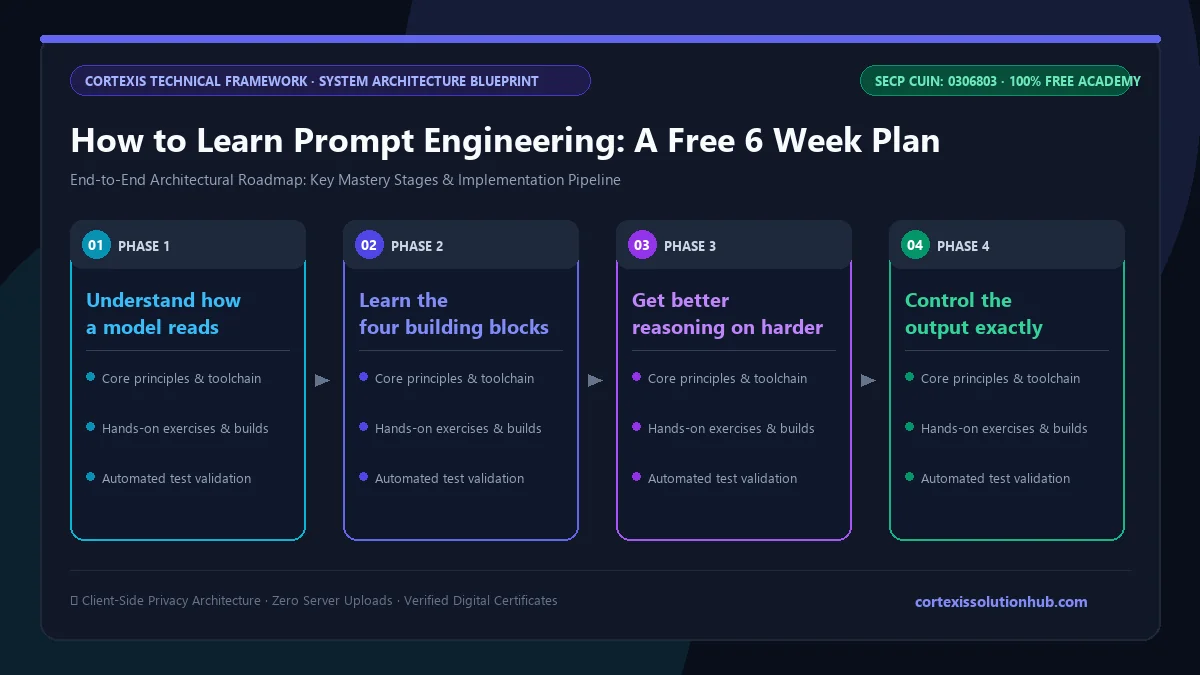
Figure 1: Complete step-by-step architectural workflow and technical execution stages for How to Learn Prompt Engineering: A Free 6 Week Plan.
How to learn prompt engineering step by step
Step 1: Understand how a model reads your prompt
You do not need maths, but you do need a mental model. Language models read text as tokens, not letters, which is why they are unreliable at counting characters or reversing words. They hold your conversation in a context window, so very long chats can push early instructions out of focus. They predict likely text, which is why they can invent facts, quotes and references that look real. And they have randomness built in, so the same prompt can give different answers.
If you need a meta description under 150 characters, ask the model to draft it, then check the length with a spreadsheet formula like LEN instead of trusting its count.
Step 2: Learn the four building blocks
Almost every good prompt has four parts:
Role: who the model should act as, such as "an experienced customer support lead".
Task: the one specific job, stated as an instruction.
Context: the facts it cannot guess, such as your audience, your product and your rules.
Format: the shape of the answer, such as a table, five bullets or 80 words.
Add delimiters (tags or clear markers around pasted text) so the model can tell your instructions apart from your data. Then add examples. One or two examples of the output you want usually do more than a paragraph of description. Models copy examples closely. If every example starts with "Introducing", most outputs will too.
Step 3: Get better reasoning on harder problems
For anything that needs thought, ask the model to work step by step before giving its answer. For big jobs, split the work into a prompt chain: one prompt for an outline, another for the draft, another for the edit. Then try a self critique loop, where the model reviews its own draft against your criteria, lists the problems and rewrites.
Step 4: Control the output exactly
Real work needs a fixed shape: a table, valid JSON, a template, or text at the right length, tone and reading level. A concrete description of the reader ("a shop owner with no technical background, short sentences, no jargon") sets the reading level far better than "write simply".
Step 5: Apply it to the work you already do
Use prompting on your actual tasks: summarising long PDFs, extracting data from emails, drafting social posts in a consistent brand voice, writing spreadsheet formulas and SQL from plain language, or debugging code. Go deep on two areas that match your job.
Step 6: Test prompts like a professional
Most self taught people skip this step. Build a small test set of realistic inputs, including the awkward ones. Score each output with a simple rubric, ideally pass or fail criteria rather than a vague 1 to 10 scale. Change one thing at a time and compare versions on the same test set. Keep your best prompts in a versioned library so you know which one is current.
A 6 week roadmap you can follow
Plan on roughly an hour a day, five days a week, split between lessons and practice on your own tasks.
Week
Focus
Practice task
1
How models work, the four building blocks
Rewrite five prompts you used this month using role, task, context and format
2
Examples, reasoning, prompt chains
Build a three step chain for one recurring job, such as a weekly report
3
Output control, documents, long context
Extract fields from ten real emails or invoices into a table
4
System prompts and custom assistants
Write instructions for a simple assistant that answers questions about one policy
5
Writing, marketing, code, data and images
Produce a batch of on brand posts or a set of working spreadsheet formulas
6
Testing, safety, career
Score two versions of one prompt on 20 inputs and write it up as a case study
Mistakes to avoid
Hunting for magic words. Phrases that once worked on one model often break after an update or on another tool. Clear briefs keep working.
Judging a prompt on one output. One good answer proves very little. Try it on ten different inputs before you trust it.
Trusting facts and references. A model with no search access can produce realistic author names and journal titles for papers that do not exist. Verify every reference yourself.
Asking it to "improve" your writing with no limits. Without a stated editing level, models tend to rewrite heavily and replace your voice with theirs. Say "fix grammar only" or "tighten, keep my wording".
Pasting private data. Customer details, passwords and confidential documents should not go into a tool your organisation has not approved.
What the free course covers, chapter by chapter
The Prompt Engineering course is rated Beginner to Intermediate, is planned for six weeks, and has 12 chapters with four lessons each. Every lesson ends with a short quiz.
How Language Models Read Your Prompt: what prompt engineering is, tokens and context windows, why models hallucinate and drift, and temperature.
The Building Blocks of a Strong Prompt: role, task, context and format, clear constraints, delimiters, and zero shot, one shot and few shot examples.
Getting Better Reasoning: step by step thinking, prompt chains, self critique loops, and choosing between fast and reasoning models.
Controlling the Output: tables and templates, JSON, length, tone and reading level, and prompts that check other prompts.
Working With Documents and Long Context: summaries that keep what matters, extracting data from PDFs, emails and forms, answering with quotes, and merging sources.
System Prompts and Custom Assistants: what a system prompt controls, instructions for GPTs, Projects and Gems, personas and guardrails, and the limits of knowledge files and memory.
Prompting for Writing and Marketing: brand voice, social posts and ad copy at scale, long form and SEO drafts, and AI as an editor.
Prompting for Code and Data: code requests, debugging, formulas and SQL from plain language, and data analysis with its limits.
Image, Audio and Video Prompting: the anatomy of an image prompt, style and iteration, video and voice tools, and rights, likeness and disclosure.
Testing and Improving Prompts: test sets, rubrics, fair comparisons and prompt libraries.
Prompt Safety and Security: prompt injection, keeping private data out, misuse limits, and reviewing output before it ships.
Prompt Engineering as a Career Skill: working across ChatGPT, Claude and Gemini, building a portfolio, freelance services, and keeping your skills current.
Who this is for, and how long it takes
The course suits students, office workers, marketers, freelancers, support staff and developers who already use a chatbot and want reliable results instead of lucky ones. You need no coding background.
Six weeks is the planned pace. Taking longer because you practise on your own work is the better outcome.
How the free certificate works
Each lesson has a 90 second reading time before its quiz unlocks, so you cannot just click through. The certificate comes from a final exam of 50 questions in 60 minutes, taken in one timed attempt. If it does not go well, one retake opens 30 days later. Leaving the exam tab submits it.
Be honest with yourself about what a certificate proves. The course itself ranks a certificate with no project attached below a tested case study. Pair it with two or three case studies: the problem, your prompt, your test set, and how the results improved between versions. We cover this in are free online certificates worth anything.
Questions, answered
05 questions
Yes. The free plans of ChatGPT, Claude and Gemini are enough to practise the core text skills, and our course, quizzes and certificate are free.
No. Most prompt engineering is clear writing and careful testing. Coding helps if you want to connect prompts to software or output JSON for an app, but beginners can learn the core skill without it.
Plan for about six weeks at an hour a day to cover the fundamentals and apply them properly. Real fluency keeps growing as you use the skill on your own work.
The job title may come and go, but the skill keeps its value. Turning a messy request into a clear brief, then testing whether the output holds up, is useful in marketing, operations, analysis, support and development roles.
Build a small portfolio. Show a real problem, your prompt, a test set, and how pass rates improved from your first version to your last. That says far more than a list of clever prompts.
Ready to start? Open the free [Prompt Engineering course](/learn/prompt-engineering) and finish the first chapter this week.