10 min read
Direct Answer: Learn how to use AI tools for free with a 4 week beginner plan. Pick one chatbot, write prompts that work, check every answer and stay safe online.
- Learn how to use AI tools for free with a 4 week beginner plan. Pick one chatbot, write prompts that work, check every answer and stay safe online.
- Authored by Umair with actionable, zero-fluff implementation guidance.
- Verified for immediate practical application, production workflows, and professional skill enhancement.
You can learn how to use AI tools for free by picking one general chatbot, such as ChatGPT, Claude or Gemini, on its free plan, and using it every day for real tasks you already do: an email, a summary, a study question. Learn to write a clear prompt, learn to check what comes back, and learn what never to paste in. That is most of the skill. Paid plans, fancy apps and "100 AI tools" lists can wait.
This guide gives you a 4 week plan, the habits that separate useful AI use from wasted time, and an honest look at our free course, AI Tools for Everyone, which takes a complete beginner through all of this in 48 short topics.
What "using AI tools" actually means
Generative AI creates new text, images, audio or video from patterns it learned from huge amounts of existing examples. The catch is that a chatbot predicts likely words. It does not look facts up unless search is switched on, and its knowledge stops at a training cutoff, so it can sound completely confident and still be wrong. That is called a hallucination, and every good habit below exists because of it.
So "knowing how to use AI" really means three things:
- Asking well, so the first draft is close to what you need.
- Checking well, so a confident mistake never reaches your boss, teacher or customer.
- Sharing carefully, so your private information stays private.
Which free AI tool should you start with?
Start with one general chatbot and the AI features already inside apps you use. For most people that covers nearly everything.
| What you want to do | A sensible starting point |
|---|---|
| Write, explain, brainstorm | A general chatbot such as ChatGPT, Claude or Gemini |
| Research with sources you can open | A chatbot with web search, or a search focused tool such as Perplexity |
| Work inside Word, Excel, Gmail or Docs | Built in assistants such as Microsoft Copilot or Gemini in Google Workspace |
| Social posts and flyers | Canva with its AI features |
| Short video edits | CapCut and similar apps |
Before signing up, ask: does an app I already use do this, does it handle Urdu and Roman Urdu well enough, and what happens to the data I type in?
Free plans have usage limits. Paid plans are normally priced in US dollars, so the rupee cost moves with the exchange rate and your bank may add a fee. Decide after a month of real use, not before.
If you want something that runs on your own computer with no account at all, we wrote about a free offline AI assistant too.
How to write a prompt that works
A weak prompt is one vague line. A good prompt has four parts: the task, the context, the format you want, and any constraints.
Compare these two:
Weak:  write an email to my landlord

Better: Write a polite, short email to my landlord asking him to fix
the water pump, which has not worked for three days. I rent the ground
floor. Keep it under 120 words, friendly but firm, in simple English.
The second one says what happened, how long and what tone. You get something you can send after a quick read.
Three more habits make a big difference:
- Give an example. If you want product descriptions in a certain style, paste one you like and say "match this style".
- Ask for a format. "Use a table with price, data, minutes and validity as columns" beats "compare these packages".
- Treat it as a conversation. If the first reply is close but not right, do not start over. Ask for specific changes: "shorter", "less formal", "keep the second paragraph, rewrite the first".
When a prompt works, save it in a small library organised by task. If prompting itself interests you, our Prompt Engineering course goes much deeper.
A 4 week plan to learn AI tools for free
Spend 20 to 30 minutes a day on real tasks from your own life, so the skill sticks.
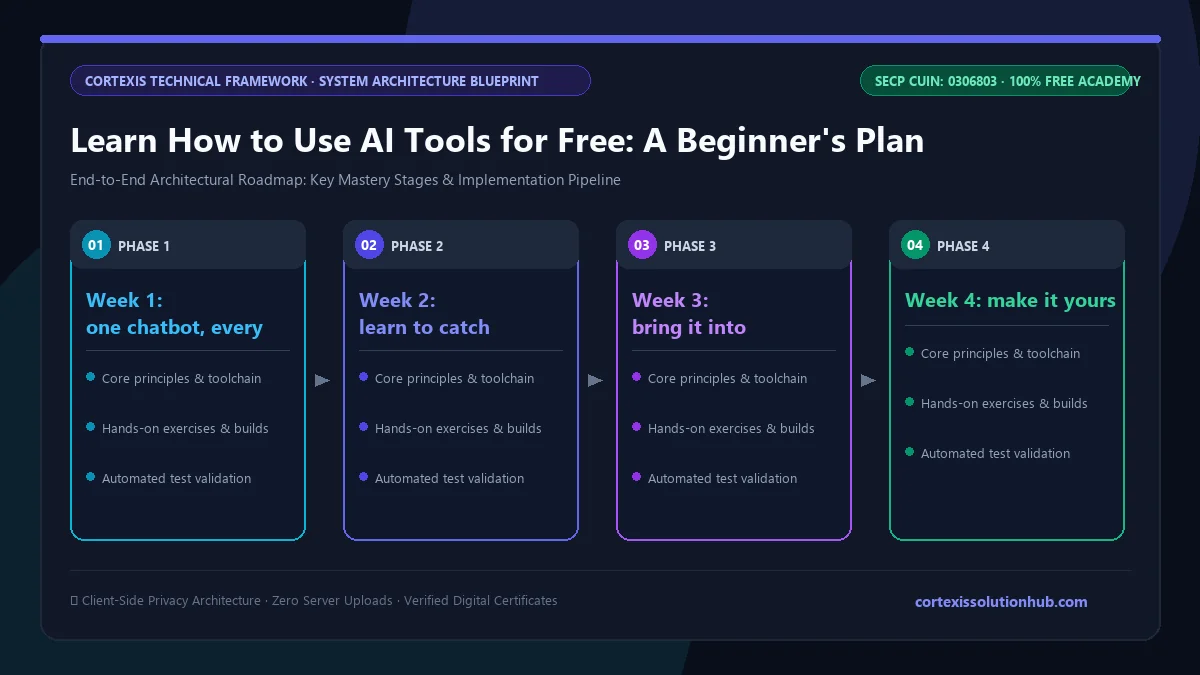
| Week | Focus | Daily practice |
|---|---|---|
| Week 1 | One tool, clear prompts | Rewrite one real message or email with AI, then edit it in your own words |
| Week 2 | Research and checking | Ask a factual question, then confirm the answer in a source you open yourself |
| Week 3 | Work and study | Summarise a document, build a spreadsheet formula, or make revision questions |
| Week 4 | Safety and your own workflow | Decide which tasks get which tool, and write down what you will never share |
Week 1: one chatbot, every day
Pick one tool and stay with it. Use it for things you would do anyway: a WhatsApp reply to a customer, a cover letter paragraph, a topic from class. Change anything that does not sound like you.
Week 2: learn to catch mistakes
The week most people skip, and the most important. Ask for facts, then check them. Chatbots have produced convincing citations to articles that do not exist, so cite only sources you opened and read yourself.
Week 3: bring it into real work
Summarise a long document and check the points against the original. Describe your columns and ask for an Excel or Sheets formula, then test it on a small sample. Students can ask for practice questions on a chapter after reading it, not instead of reading it.
Week 4: make it yours
Write down which tool you use for which task. Add custom instructions about your background and preferences. Then write a "never share" list: passwords, one time banking codes, CNIC numbers, salary sheets, other people's private details.
Mistakes to avoid when you start
- Trusting a confident tone. A precise looking statistic in an AI draft is a warning sign, not proof. Remove it, or use only figures you supplied.
- Pasting sensitive data. Strip names, CNIC numbers and amounts from a spreadsheet before asking for help with it.
- Chasing every new app. A few tools assigned to regular tasks beats changing tools every week.
- Letting it think for you. Use AI for explanations and feedback, do the thinking yourself, and follow your school's or employer's rules.
- Falling for AI scams. Voice cloning and deepfakes make fake emergencies more convincing. If a "relative" calls asking for money urgently, hang up and call them back on the number you know.
What the free AI Tools for Everyone course covers
The AI Tools for Everyone course is a beginner course with no technical background needed. It has 12 chapters, each with four topics, so 48 topics in all, and each topic is a 12 to 14 minute read with its own short quiz.
| Chapter | What you learn |
|---|---|
| 1. Understanding AI Tools | What generative AI is and is not, how chatbots like ChatGPT, Claude and Gemini work, choosing a tool, free versus paid plans |
| 2. Prompting That Works | Task, context, format and constraints, examples, iterating in conversation, reusable templates |
| 3. Writing and Communication | Emails, reports and proposals, tone and English to Urdu translation, keeping your own voice |
| 4. Research and Learning | Learning faster, research with sources, spotting hallucinations, summarising long documents and videos |
| 5. Productivity at Work | Spreadsheets and data, meetings and action items, presentations, planning tasks and schedules |
| 6. Images, Audio and Video | Creating and editing images, transcription and text to speech, AI video tools, honest labelling |
| 7. AI for Students and Teachers | Studying without cheating, exam practice questions, lesson plans, academic integrity |
| 8. AI for Small Businesses and Freelancers | Marketing posts, customer replies, honest product descriptions, freelancing faster |
| 9. Automation Without Being a Programmer | Code help for beginners, formulas and simple scripts, no code automation, simple custom assistants |
| 10. Safety, Privacy and Ethics | What not to share, scams and deepfakes, bias, copyright and disclosure |
| 11. AI in Urdu and Pakistani Contexts | Urdu and Roman Urdu prompting, everyday family and business uses, accessibility, local language limits |
| 12. Your AI-Powered Future | A personal workflow, evaluating new tools, careers and skills, staying current without overwhelm |
Chapter 11 is the one most global courses lack: what AI does well in Urdu, where it struggles, and prompts like "keep technical terms in English where Pakistanis normally use English".
Who it is for
Students, teachers, office workers, shopkeepers, freelancers and parents who want to use AI properly without coding. If you already use ChatGPT daily and want to build automations or agents, look at AI Automation and Agents instead.
How long it takes
The reading adds up to roughly ten hours across the 48 topics. The course is planned as 4 weeks, which matches the plan above. Each topic needs at least 90 seconds of reading before its quiz unlocks, and you need 70 percent on a topic quiz to open the next topic, so you cannot skip ahead by guessing.
How the free certificate works
The certificate comes from a final exam of 50 questions in 60 minutes. You need 50 out of 100 marks to pass. You get one timed attempt, and if it does not go well, one retake after 30 days with the same questions in a new order and the options shuffled. Leaving the exam tab, even to switch apps, submits it, so sit it when you have a quiet hour. Whether a free certificate helps your CV depends on how you use it, which we cover in are free online certificates worth anything.
Questions, answered
06 questions
Yes. The free plans of the main chatbots are enough to learn every core skill: prompting, checking answers, summarising and drafting. Our course is free too, including the certificate.
No. You type requests in plain English, Urdu or Roman Urdu. Even the course's automation chapter is written for non programmers.
All three handle everyday writing and explaining well, and quality changes with each new model. Try the same real task in two of them for a week and keep the one whose answers you edit least.
Mostly, for everyday tasks. Understanding questions, simple translation and Roman Urdu chats usually work well. Poetry, idioms, formal legal Urdu and Urdu text inside AI images are weak spots, so check those carefully.
It depends on your institution's rules and how you use it. Having AI explain a topic or quiz you is studying. Submitting its writing as your own, or using it in an exam, is not.
With 20 to 30 minutes of real practice a day, most beginners feel confident within about a month. The [free AI Tools for Everyone course](/learn/ai-tools-for-everyone) follows the same 4 week pace, so start today and use it on one real task before you close the tab.