Direct Answer: Automate the repetitive work every business drowns in, then give it a brain: workflows in n8n, Make and Zapier, language models that read and write, and agents that act with tools.
Tuition Fee
100% Free
Duration & Workload
~11 Hours
Curriculum Depth
12 Chapters · 48 Lessons
Credential Awarded
Verified Certificate
12Chapters
Course outline
Learn to see a business as triggers, data and actions, read the JSON that carries it, and pick the platform that fits the job.
Spotting Work That Should Not Be Done by Hand13 min
Triggers, Actions and the Data Between Them12 min
Reading JSON Without Fear13 min
Choosing a Platform: n8n, Make or Zapier14 min
Install n8n, receive data from other apps through webhooks, reshape it with expressions, and route it down different paths.
Installing n8n and Finding Your Way Around13 min
Webhooks: Letting Other Apps Call You14 min
Expressions and Mapping Data Between Nodes14 min
Branching, Filtering and Merging Paths13 min
Use Google Sheets as a working database, send email that lands in the inbox, call any API directly, and keep every secret out of sight.
Google Sheets as a Lightweight Database13 min
Sending Email That People Actually Receive13 min
Calling Any API with the HTTP Request Node15 min
Credentials and Secrets Done Properly12 min
Make workflows fail loudly, retry sensibly, run twice without harm, cope with large data, and stay understandable months later.
Error Workflows and Failure Alerts13 min
Retries, Rate Limits and Running Twice Safely14 min
Schedules, Batches and Large Data Sets13 min
Testing, Versioning and Documenting a Workflow12 min
Add a language model as a step that reads messy text, returns structured data, routes messages and drafts replies a human can trust.
How a Language Model Fits Into an Automation13 min
Prompting for Structured Output14 min
Classifying and Routing Messages with AI13 min
Summaries, Extraction and Draft Replies13 min
Give a model your own prices, policies and documents at question time, so it answers from facts instead of confident guesses.
Why the Model Does Not Know Your Prices12 min
Embeddings and Vector Stores in Plain Terms13 min
Building a Knowledge Base Pipeline14 min
Answer Quality: Sources, Refusals and Freshness13 min
Build agents that choose their own steps with tools, remember the conversation, and stay inside limits you enforce in code.
What Makes an Agent Different from a Workflow13 min
Tools: Giving an Agent Hands14 min
Memory and Conversation State13 min
Guardrails, Approvals and a Human in the Loop14 min
Put your agent where customers already talk: a website chat, WhatsApp, Telegram and email, with a clean handover to a person when it matters.
A Chat Assistant for a Website13 min
WhatsApp Business Automation15 min
Telegram and Email Bots13 min
Handing a Conversation to a Human13 min
Build four complete automations that clients actually pay for: lead follow-up, invoice reading, a content pipeline and cash-on-delivery confirmation.
Lead Capture, CRM and Follow-Up14 min
Reading Invoices and Receipts Automatically14 min
A Social Media Content Pipeline13 min
Order Confirmation for Cash on Delivery14 min
Work confidently in the platforms many clients already pay for, move workflows between them safely, and keep per-task bills under control.
Zapier: Zaps, Paths and Formatter13 min
Make: Scenarios, Routers and Iterators13 min
Moving a Workflow Between Platforms13 min
Keeping Task-Based Bills Under Control12 min
Deploy n8n on a server with a domain and HTTPS, scale it with workers, secure webhooks and access, and keep it monitored and backed up.
Self-Hosting n8n with Docker Compose14 min
Queue Mode and Scaling Workers13 min
Securing Webhooks, Access and Updates14 min
Monitoring, Logs and Backups12 min
Turn the skills into income: find the first clients, scope and price honestly, deliver work clients can own, and build recurring revenue.
Finding the First Automation Client13 min
Scoping, Pricing and Writing the Proposal14 min
Delivering, Documenting and Handing Over13 min
Retainers and Growing an Automation Practice13 min
Final exam & certificate
01
Topic checks
Each one opens the next topic
02
Chapter quizzes
Each one opens the next chapter
03
50-question final
50 of 100 marks to pass
04
Certificate
Issued instantly, verifiable
One attempt, 60 minutes. If you don't pass, you can retake once after 30 days.
The course guide
How to learn AI automation: a beginner roadmap
16 October 2026 · 9 min read
To learn AI automation, learn plain automation first. Build workflows that move data between apps on a trigger, make them reliable, and only then add a language model as one step inside them. Agents come last, once you can already build a workflow that does not break.
This guide gives you that order as a six week roadmap, the mistakes that waste the most time, and what our free AI Automation & AI Agents course covers chapter by chapter, so you can decide whether it fits you.
What AI automation actually means
Strip away the marketing and there are three layers, and each one depends on the one beneath it.
Layer
What it does
Example
Workflow automation
Follows fixed rules when something happens
A new order arrives, it is added to a Google Sheet and the customer gets an email
AI inside a workflow
A language model handles one messy step
Read a customer's message in Roman Urdu and pull out the product, size and city as clean data
AI agent
The model chooses which tools to use and in what order
A chat bot that checks stock, looks up an order and decides when to hand over to a person
Most paid work sits in the first two layers. A shop owner copying orders into a sheet every morning needs a webhook and a confirmation message, not an agent. Agents are real and useful, but they are the top of the pyramid, not the entrance.
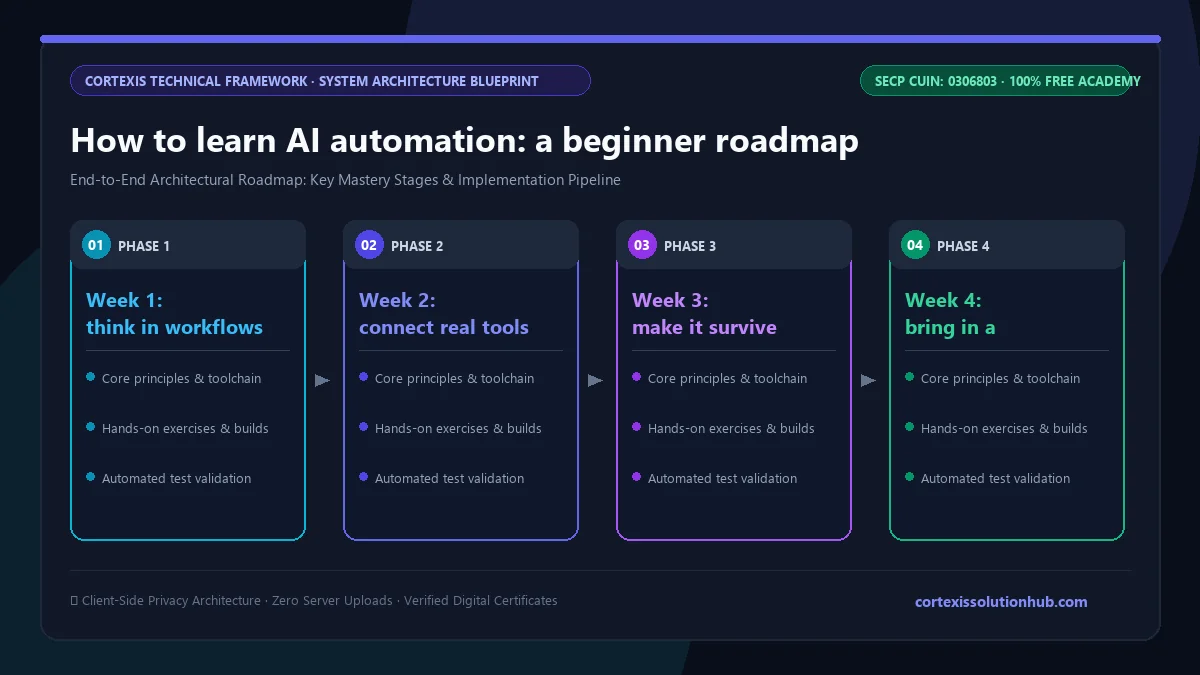
Figure 1: Complete step-by-step architectural workflow and technical execution stages for How to learn AI automation: a beginner roadmap.
The skills you need before the AI part
You do not need to be a programmer. You do need to be comfortable with a few ideas that the AI tutorials skip.
Triggers, actions and data. Every automation starts with an event (a form submitted, a payment received, a time of day) and passes data to a series of actions.
JSON. Almost every app hands data around as JSON. If you can read an object, an array and a nested field without panic, you are ready. If not, this is the first thing to fix.
APIs. Sooner or later the app you need has no ready-made connector. Knowing how to read an API's documentation and send a request yourself is what separates people who can deliver from people who get stuck.
Spreadsheets as data. Google Sheets is the database for a huge number of small businesses. Treat rows and columns like records, with a unique ID column.
Basic prompting. Writing clear instructions and asking for a fixed output shape. Our Prompt Engineering course goes deeper on this if you want it.
A 6 week roadmap to learn AI automation
The course is designed as six weeks of study. Here is a sensible way to spend them, whether you use our course or another resource.
Week 1: think in workflows and build your first ones
Pick one small, boring, repeated task from your own life or a family business. Write down every step. Then install n8n and rebuild that task with a trigger, a couple of nodes and an output. Learn webhooks early, because they are how other apps call your workflow the moment something happens.
Week 2: connect real tools
Work with Google Sheets, email and the HTTP Request node. Practise calling a public API and mapping its response into a sheet. Learn to store credentials properly instead of pasting keys into nodes.
Week 3: make it survive real life
This is the week most self-taught learners skip, and it is the one clients notice. Add an error workflow that alerts you when something fails. Handle rate limits and retries. Make sure a workflow that runs twice by accident does not book two couriers or charge twice.
Week 4: bring in a language model
Add a model as a single step: classify incoming messages, extract fields from messy text, summarise a long thread, draft a reply that a human approves. Insist on structured output, and test with messages written the way real customers write, including Roman Urdu and spelling mistakes.
Week 5: retrieval and agents
Give the model your own documents with retrieval, so a bot answers from your actual prices and policies instead of guessing. Then build an agent with a small set of tools, memory, and limits enforced in code rather than in the prompt.
Week 6: ship something end to end
Build one complete automation a business would pay for, such as lead follow-up, invoice reading or cash on delivery confirmation. If you want a worked example of that last one, read how to automate WhatsApp order confirmation for COD.
What the free course covers, chapter by chapter
AI Automation & AI Agents has 12 chapters with 4 topics each, 48 topics in all, and runs from Beginner to Intermediate. Each topic takes roughly 12 to 15 minutes to read.
Thinking in Workflows. Spotting work that should not be done by hand, triggers and actions, reading JSON, and choosing between n8n, Make and Zapier.
Your First Automations in n8n. Installing n8n, webhooks, expressions for mapping data, and branching, filtering and merging paths.
Connecting the Tools a Business Already Uses. Google Sheets as a lightweight database, email that lands in the inbox, the HTTP Request node, and credentials done properly.
Automations That Survive Real Life. Error workflows, retries and rate limits, running twice safely, schedules and batches, and testing, versioning and documenting.
Bringing Language Models Into the Workflow. Where a model fits, prompting for structured output, classifying and routing messages, and summaries, extraction and draft replies.
Retrieval: Teaching the Bot Your Business. Why the model does not know your prices, embeddings and vector stores in plain terms, a knowledge base pipeline, and answer quality.
AI Agents. How an agent differs from a workflow, tools, memory, and guardrails with a human in the loop.
Chat and Messaging Bots. A website chat assistant, WhatsApp Business automation, Telegram and email bots, and handing a conversation to a person.
Real Business Automations, End to End. Lead capture and follow-up, reading invoices and receipts, a social media content pipeline, and cash on delivery order confirmation.
Zapier and Make for Client Work. Zaps, paths and Formatter, Make scenarios and routers, moving a workflow between platforms, and keeping task-based bills under control.
Running n8n in Production. Self-hosting with Docker Compose, queue mode and workers, securing webhooks and access, and monitoring, logs and backups.
Selling Automation as a Service. Finding the first client, scoping and pricing, delivering and handing over, and retainers.
The examples are local on purpose: a Lahore clothing store, Roman Urdu messages, courier APIs and cash on delivery.
Mistakes that slow most learners down
Starting with agents. An agent that cannot reliably call one API is not an agent, it is a guess generator. Get workflows solid first.
Trusting the prompt to enforce rules. If a bot must never give more than a set discount, enforce that limit inside the tool the agent calls. A firmer system message is not a guardrail.
Testing only with neat English. Real messages are short, mixed language and misspelled. A classifier that passes your tidy test set and fails on real customers is the most common disappointment in this kind of project.
No error handling. A workflow that fails silently loses orders. Clients forgive a failure you caught. They do not forgive one they found themselves.
Building on your own accounts for clients. When you deliver, the client should own the platform accounts and see the real costs. It protects both of you if you part ways.
Who this is for and how long it takes
It suits students who want a practical skill alongside a degree, freelancers who want a service to sell, people working in small businesses who are tired of copy and paste, and developers who want to add AI features without starting from research papers. You do not need prior coding, though comfort with a computer and patience with JSON help a lot.
Six weeks is a realistic pace if you study most days and build each example yourself. Weekends only will take longer, and that is fine.
The course is free, and so is the certificate. Each topic has a short quiz you must pass before the next topic unlocks, and each chapter has a practice quiz with instant feedback.
The certificate depends on the final exam: 50 questions, 60 minutes, one attempt, and you pass with half the marks or more. If you fail, you get one retake 30 days later, with the questions and options reshuffled. The certificate carries a verification code and a public page anyone can check. It proves you passed our exam, nothing more. What gets you hired is a working automation you can show, so build one as you go.
Questions, answered
06 questions
Yes, for most of it. n8n, Make and Zapier are visual tools, and the course is written for beginners. You will still read JSON and write small expressions, and being comfortable with those is what lets you handle the jobs that do not fit a ready-made connector.
Start with one and learn it properly. The course uses n8n for most of the building because it can be self-hosted and shows you how data moves between steps, then covers Zapier and Make for client work, since many clients already pay for one of them.
The course is planned as six weeks of steady study. You can build simple useful workflows within the first week or two. Reliable production work, retrieval and agents take the rest of that time and plenty of practice afterwards.
Small businesses here run on WhatsApp, Google Sheets and cash on delivery, and much of that work is repetitive. That makes automation a practical service to offer. Earnings depend on your clients and your delivery, so treat any income claim you see online with caution.
A workflow follows the same steps every time. An agent is given tools and decides which ones to use for each request. Use a workflow when the steps are fixed, and an agent only when the requests genuinely vary.
Yes. There is no fee for the course, the exam or the certificate. You need to pass the timed final exam to receive it.
Ready to start? Open [AI Automation & AI Agents](/learn/ai-automation-agents), begin with the first chapter, and pick one boring task to automate this week.