Direct Answer: Build and publish real 2D and 3D games with Unity and C#: scripting, physics, input, prefabs, animation, UI, AI enemies, saving, performance for mobile, and publishing to Google Play and the web.
Tuition Fee
100% Free
Duration & Workload
~11 Hours
Curriculum Depth
12 Chapters · 48 Lessons
Credential Awarded
Verified Certificate
12Chapters
Course outline
Understand what Unity is and what kinds of games it builds, install Unity Hub and the editor with the right modules, find your way around the editor's windows, and build a first scene from GameObjects and components.
What Unity Is and What You Can Build12 min
Installing Unity Hub and the Editor13 min
A Tour of the Unity Editor13 min
Your First Scene: GameObjects and Components14 min
Learn the C# essentials used in Unity scripts, understand MonoBehaviour and the order in which Unity calls its methods, expose values in the Inspector safely, and debug scripts with the Console and breakpoints.
C# Basics for Game Developers13 min
MonoBehaviour and the Script Lifecycle14 min
Variables, the Inspector and SerializeField13 min
Debugging With the Console and Breakpoints12 min
Move and rotate objects with transforms and vectors, read player input with Unity's Input System, simulate movement with rigidbodies and colliders, and respond to collisions and triggers to build gameplay.
Transforms, Vectors and Rotation13 min
Player Input With the Input System13 min
Rigidbodies and Colliders14 min
Collisions and Triggers13 min
Import and organise sprites with sorting layers, design levels quickly with tilemaps, write a platformer controller that feels good to play, and make the camera follow the player smoothly with Cinemachine.
Sprites, Sorting and 2D Setup13 min
Tilemaps for Level Design14 min
A 2D Platformer Controller15 min
Camera Follow With Cinemachine13 min
Turn objects into reusable prefabs and variants, spawn and destroy them at runtime, store game data in ScriptableObjects, and connect systems with events so that code stays organised as a game grows.
Prefabs and Prefab Variants13 min
Spawning and Destroying Objects13 min
ScriptableObjects for Game Data14 min
Events and Decoupled Code13 min
Animate characters with the Animator, add particles and visual effects, bring the game to life with sound and music, and apply the small touches of polish, such as screen shake and hit pauses, that make actions feel satisfying.
Animation With the Animator14 min
Particles and Visual Effects13 min
Sound Effects and Music13 min
Juice: Screen Shake, Timing and Polish13 min
Build interfaces with the Canvas, TextMeshPro and layout groups, create menus that move between scenes, design HUDs for health, score and time, and make the UI fit every phone screen, including notches and different aspect ratios.
Canvas, TextMeshPro and Layout13 min
Menus, Buttons and Scene Flow13 min
HUDs: Health Bars, Scores and Timers13 min
UI That Works on Every Phone14 min
Build 3D scenes with lighting, materials and post-processing, create a third-person character with a following camera, give enemies navigation with NavMesh, and use raycasts for shooting, aiming and interaction.
3D Scenes, Lighting and Materials14 min
A Third-Person Character Controller14 min
Enemies That Navigate With NavMesh14 min
Raycasts, Shooting and Interaction13 min
Organise the game with states and managers, save and load progress reliably, design levels, difficulty and progression that keep players engaged, and use coroutines to handle timing and sequences.
Game States and Managers13 min
Saving and Loading Progress14 min
Levels, Difficulty and Progression13 min
Coroutines and Timing13 min
Measure performance with the Profiler instead of guessing, optimise rendering, memory and physics for phones, reuse objects with pooling to avoid garbage collection spikes, and test with automated tests and real players.
Profiling a Game14 min
Optimising for Mobile Devices14 min
Object Pooling and Garbage Collection13 min
Testing and Playtesting13 min
Configure builds for each platform, publish an Android game on Google Play, release web and PC builds on itch.io and beyond, and choose a monetisation model with ads and in-app purchases that respects players.
Build Profiles and Target Platforms13 min
Publishing on Google Play14 min
Web Builds, PC and itch.io13 min
Monetisation: Ads and In-App Purchases14 min
Design games around a clear core loop and scope, build a portfolio that proves you can ship, understand the game industry in Pakistan and internationally, and grow through game jams, communities and continued learning.
Designing Games People Want to Play13 min
Building a Game Development Portfolio13 min
The Game Industry in Pakistan and Beyond14 min
Game Jams, Communities and Next Steps13 min
Final exam & certificate
01
Topic checks
Each one opens the next topic
02
Chapter quizzes
Each one opens the next chapter
03
50-question final
50 of 100 marks to pass
04
Certificate
Issued instantly, verifiable
One attempt, 60 minutes. If you don't pass, you can retake once after 30 days.
The course guide
How to learn Unity game development: a beginner roadmap
16 October 2026 · 10 min read
If you want to know how to learn Unity game development, here is the honest answer: learn the editor and enough C# to read a script, then build one small 2D game from start to finish, then a small 3D one, and finally publish something that a stranger can download and play. Most beginners get stuck because they watch tutorials without typing, start with a dream open world game, and never ship anything. Small, finished games teach you more than any number of half built ones.
This guide gives you a roadmap in order, the mistakes that waste the most time, and an exact chapter by chapter look at our free Game Development with Unity course, so you can judge whether it fits you before you start.
What Unity is and why people start with it
Unity is a game engine. It handles rendering, physics, sound, input and packaging your game for different platforms, so you can spend your time on the parts that make your game yours. One project can target Android, iOS, Windows, macOS and the web, which matters a lot if you are a solo developer.
Scripts are written in C#, a language also used far outside games, so the time you spend on it carries over if you later move into backend or desktop work.
Unity is especially strong for mobile, 2D and smaller 3D games, which makes it a sensible place for a beginner to start.
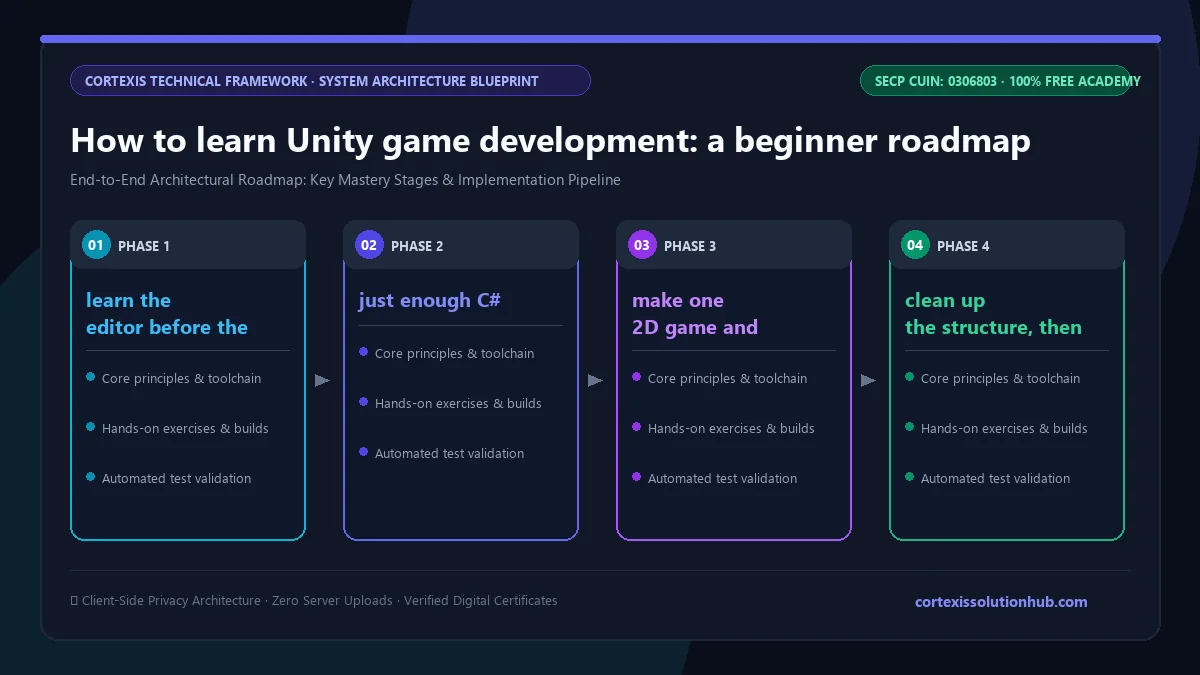
Figure 1: Complete step-by-step architectural workflow and technical execution stages for How to learn Unity game development: a beginner roadmap.
How to learn Unity game development: the roadmap
Each stage has a clear sign that you are ready for the next.
Stage
What you learn
You are ready to move on when
1. The editor
Unity Hub, scenes, GameObjects, components, the Inspector
You can build a simple scene without searching where each window is
2. C# for Unity
Variables, methods, classes, MonoBehaviour, Start and Update
You can explain why physics code belongs in FixedUpdate
3. Movement and physics
Transforms, vectors, the Input System, rigidbodies, colliders, triggers
A player moves, jumps and collects something without falling through the floor
4. A complete 2D game
Sprites, tilemaps, a platformer controller, a following camera
Someone else can play a level from start to end
5. Structure
Prefabs, spawning, ScriptableObjects, events
Adding a new enemy type does not mean editing five scripts
6. Feel and UI
Animation, particles, sound, menus, HUDs
The game has a start screen, a score and sounds that respond to actions
7. 3D and systems
Lighting, a character controller, NavMesh enemies, raycasts, saving
Progress survives closing the game
8. Ship it
Profiling, mobile optimisation, builds, Google Play, itch.io
A build runs on a phone that is not yours
Step 1: learn the editor before the code
Spend your first few days just building scenes. The core idea of Unity is that a GameObject is an empty container and its components give it everything it does. Once that clicks, the rest of the editor makes sense.
Step 2: just enough C#
You do not need to master C# before touching Unity. You need variables, if statements, loops, methods and classes, and then the Unity specific part: MonoBehaviour and the order in which Unity calls methods like Awake, Start, Update and FixedUpdate. Learn to read the Console and use a breakpoint early. Debugging well is half the job.
A short platformer touches input, physics, collisions, a camera and a win and lose condition. Keep it to one or two levels. The goal is to finish, not to impress.
Step 4: clean up the structure, then go 3D
Your first game will have messy code. Before your second, learn prefabs, ScriptableObjects and events, then build a small 3D game with a third person character and enemies that chase the player.
Step 5: publish
Publishing is a skill of its own. A web build on itch.io is the gentlest first release. A Google Play release teaches you the most, but new personal developer accounts must run a closed test with a group of testers before going live, so start recruiting testers early.
Mistakes that slow beginners down
Watching instead of typing. Type along and change something in every tutorial; passive watching leaves little behind.
Starting too big. Pick a game you could describe in one sentence and build in two weeks.
Putting everything in one script. A single PlayerController that handles movement, health, score, sound and UI becomes impossible to change. Split responsibilities early.
Using Update for physics. Applying forces in Update makes movement depend on frame rate. Read input in Update, then apply forces in FixedUpdate, which runs in step with physics.
Ignoring version control. One bad change can break a project you spent weeks on. Learn Git from day one with our Git and GitHub course and add a proper Unity .gitignore.
Following outdated tutorials blindly. Unity changes between versions. In Unity 6, for example, Build Settings became Build Profiles, and in Cinemachine 3 the virtual camera is now called CinemachineCamera. When a menu does not exist, check the version the tutorial used.
What the free Unity course covers, chapter by chapter
What Unity builds, installing Unity Hub and the editor with the right modules, an editor tour, your first scene from GameObjects and components
2. C# Scripting Foundations
C# basics for games, MonoBehaviour and the script lifecycle, SerializeField and the Inspector, debugging with the Console and breakpoints
3. Movement, Input and Physics
Transforms, vectors and rotation, the Input System, rigidbodies and colliders, collisions and triggers
4. Building a 2D Game
Sprites and sorting layers, tilemaps, a 2D platformer controller, camera follow with Cinemachine
5. Prefabs and Game Architecture
Prefabs and variants, spawning and destroying objects, ScriptableObjects, events and decoupled code
6. Game Feel and Feedback
The Animator, particles and effects, sound and music, screen shake, hit pauses and polish
7. User Interface
Canvas, TextMeshPro and layout groups, menus and scene flow, HUDs for health, score and time, UI that fits every phone including notches
8. 3D Game Development
Lighting, materials and post processing, a third person character controller, NavMesh enemies, raycasts for shooting and interaction
9. Game Systems
Game states and managers, saving and loading, levels, difficulty and progression, coroutines
10. Performance and Testing
The Profiler, optimising for mobile, object pooling and garbage collection, automated tests and playtesting
11. Publishing Your Game
Build profiles and platforms, publishing on Google Play, web and PC builds on itch.io, ads and in app purchases that respect players
12. Careers in Game Development
Designing around a core loop, building a portfolio, the game industry in Pakistan and beyond, game jams and communities
The last chapter also explains the mobile publisher model, where publishers test prototypes with small marketing campaigns before investing, and what Unity interviews usually ask about: Update versus FixedUpdate, prefabs, ScriptableObjects, garbage collection and pooling.
Who this course is for
Complete beginners who want to make games and are willing to learn C# along the way.
Programmers from other areas moving into games. If you want to go deeper into engines later, our C++ course is a good companion.
Students in Pakistan looking at junior Unity developer, gameplay programmer or QA roles at mobile game studios.
Designers and artists who want to prototype their own ideas. If you lean towards the visual side, pair it with the UI/UX course for menus and interfaces.
It does not teach 3D modelling or drawing. You will use sprites, models and sounds, but creating art is a separate skill.
How long it takes to learn Unity
The course is planned as 8 weeks, and the reading itself is about 11 hours. The real work is typing the examples and building your own small game alongside; at an hour a day, 8 weeks is realistic for the core material.
Being job ready takes longer, because employers want finished projects. Aim for two or three small, polished games, at least one of them published. Game jams help: a deadline forces you to cut scope and finish.
How the quizzes and free certificate work
Each topic has a minimum reading time of 90 seconds before its quiz opens, and you need 70 percent on that quiz to unlock the next topic. Each chapter also ends with a quiz you must pass at 70 percent to open the next chapter, and the final exam opens only after every chapter quiz is passed.
The certificate comes from the final exam: 50 questions, 60 minutes, one timed attempt, and you pass with 50 out of 100 marks. If you do not pass, a retake opens 30 days later with the questions and options reshuffled. Pass, and you get a free certificate with a verification code and a QR code anyone can check. Be realistic, though: a studio will care far more about a game it can play than about any certificate, ours included. We wrote more about that in are free online certificates worth anything.
Start building
The fastest way to learn Unity game development is to finish small games, one after another, and to publish at least one of them. Start the free Game Development with Unity course, build the 2D platformer as you go, and by the end you will have something real to show.
Questions, answered
05 questions
Unity offers a free Personal plan for individuals and small teams below a revenue limit. The terms have changed over time, so check Unity's official plans page for the current conditions.
Yes, but you will learn some C# along the way. You do not need to master it first. Learn the basics and apply them in Unity immediately.
Start with 2D. It has fewer moving parts, so you can focus on scripting, physics and game structure. The course builds a 2D platformer before moving on to 3D for exactly this reason.
There are studios in cities such as Lahore, Karachi and Islamabad, many building mobile games for international markets, and some companies hire remotely. Openings change quickly, so research current companies on LinkedIn and bring a portfolio of finished games.
Plan around 8 weeks at an hour a day for the fundamentals. Junior roles usually take longer, depending on how many projects you finish.