Direct Answer: Go from your first container to running real applications on Kubernetes: Dockerfiles, Compose, pods, deployments, services, ingress, config, storage, autoscaling, Helm, security and troubleshooting, with CKAD exam preparation.
Tuition Fee
100% Free
Duration & Workload
~10 Hours
Curriculum Depth
12 Chapters · 48 Lessons
Credential Awarded
Verified Certificate
12Chapters
Course outline
Understand why containers transformed software deployment, how they differ from virtual machines, install Docker and run your first containers, and learn how images, layers and registries fit together.
Why Containers Changed Deployment13 min
Containers Versus Virtual Machines13 min
Installing Docker and Running Your First Container13 min
Images, Layers and Registries Explained13 min
Use the Docker commands you will need daily, containerise your own application with a Dockerfile, configure containers with environment variables, ports and logs, and debug running containers with exec, inspect and stats.
Everyday Docker Commands12 min
Writing Your First Dockerfile14 min
Environment Variables, Ports and Logs13 min
Debugging Containers With exec and inspect13 min
Speed up builds with layer caching and BuildKit features, shrink images with multi-stage builds, choose base images deliberately, and harden images by scanning for vulnerabilities and running as a non-root user.
Layer Caching and Build Speed13 min
Multi-Stage Builds for Small Images13 min
Choosing Base Images Wisely12 min
Scanning Images and Running as Non-Root13 min
Keep data safe with volumes and bind mounts, connect containers through networks and built-in DNS, define multi-container applications with Docker Compose, and build fast local development workflows.
Volumes and Bind Mounts13 min
Docker Networks and Container DNS13 min
Docker Compose for Multi-Container Apps14 min
Compose for Development Workflows12 min
Understand why container orchestration exists, learn the parts of a Kubernetes cluster and how they cooperate, create a local cluster with kind or minikube, and work confidently with kubectl and YAML manifests.
Why Orchestration Is Needed13 min
The Control Plane and Worker Nodes13 min
A Local Cluster With kind or minikube12 min
kubectl Essentials and YAML Manifests14 min
Understand pods and their lifecycle, run resilient applications with Deployments and ReplicaSets, ship new versions with rolling updates and roll back safely, and run batch and per-node work with Jobs, CronJobs and DaemonSets.
Pods and Their Lifecycle13 min
Deployments and ReplicaSets13 min
Rolling Updates and Rollbacks13 min
Jobs, CronJobs and DaemonSets12 min
Give pods stable addresses with ClusterIP, NodePort and LoadBalancer Services, route HTTP traffic with Ingress and the Gateway API, find services through cluster DNS, and restrict traffic with network policies.
Service Types: ClusterIP, NodePort and LoadBalancer14 min
Ingress and the Gateway API13 min
DNS and Service Discovery12 min
Network Policies13 min
Supply application settings with ConfigMaps, handle credentials with Secrets while understanding their limits, give pods durable storage with persistent volumes and claims, and run stateful applications with StatefulSets.
ConfigMaps for Application Settings13 min
Secrets and Their Limits13 min
Persistent Volumes and Claims13 min
StatefulSets for Stateful Apps12 min
Tell Kubernetes when applications are alive and ready with probes, reserve and cap CPU and memory with requests and limits, scale automatically with the Horizontal Pod Autoscaler, and share clusters fairly with namespaces, quotas and limit ranges.
Liveness, Readiness and Startup Probes14 min
Requests, Limits and Quality of Service13 min
Horizontal Pod Autoscaling13 min
Namespaces, Quotas and Limit Ranges12 min
Package applications as Helm charts, manage environment differences with Kustomize overlays, tag and pull images reliably from private registries, and build a CI/CD pipeline that delivers tested images to Kubernetes.
Helm Charts14 min
Kustomize Overlays13 min
Image Tags, Registries and Pull Secrets12 min
A CI/CD Pipeline to Kubernetes13 min
Control who can do what with RBAC and service accounts, harden pods with security contexts and Pod Security Standards, troubleshoot failing pods, services and nodes systematically, and use events, logs and metrics to see inside the cluster.
RBAC and Service Accounts13 min
Pod Security and Security Contexts13 min
Troubleshooting Pods, Services and Nodes14 min
Events, Logs and Metrics in the Cluster12 min
Compare managed Kubernetes on EKS, AKS and GKE, deploy a complete application end to end, prepare effectively for the hands-on CKAD exam, and plan a career in DevOps and platform engineering.
Managed Kubernetes: EKS, AKS and GKE13 min
Deploying a Complete Application14 min
Preparing for the CKAD Exam13 min
Careers in DevOps and Platform Engineering12 min
Final exam & certificate
01
Topic checks
Each one opens the next topic
02
Chapter quizzes
Each one opens the next chapter
03
50-question final
50 of 100 marks to pass
04
Certificate
Issued instantly, verifiable
One attempt, 60 minutes. If you don't pass, you can retake once after 30 days.
The course guide
How to learn Docker and Kubernetes, step by step
16 October 2026 · 10 min read
The way to learn Docker and Kubernetes is in that order, and with your hands on a terminal the whole time. Spend the first few weeks on Docker alone: run containers, write Dockerfiles for your own apps, and wire several services together with Docker Compose. Only once a container feels ordinary should you start Kubernetes, on a free local cluster on your own laptop, not a cloud account. Kubernetes runs containers. If you do not understand the container, every Kubernetes error will look like magic.
This page is the plan we would give a friend. Our free Docker & Kubernetes course follows the same order across 12 chapters, so you can read this as the map and use the course as the road.
What Docker and Kubernetes actually do
Docker packages an application with everything it needs to run: the runtime, libraries, system files and default configuration. That package is an image, and a running copy of it is a container. The image runs the same way on your laptop, a test server and production, which ends the old "works on my machine" argument.
Kubernetes decides where and how many containers run across a group of machines, restarts them when they crash, replaces them during an update without downtime, and gives them stable network addresses. One container on one server does not need it. Twenty services across five servers very much do.
Docker
Kubernetes
Main job
Build and run containers
Run many containers across many machines
Unit you work with
Image, container
Pod, Deployment, Service
Where you start
Your laptop
A local cluster with kind or minikube
Config files
Dockerfile, compose.yaml
YAML manifests, Helm charts
Useful alone?
Yes, from day one
Only after you know containers
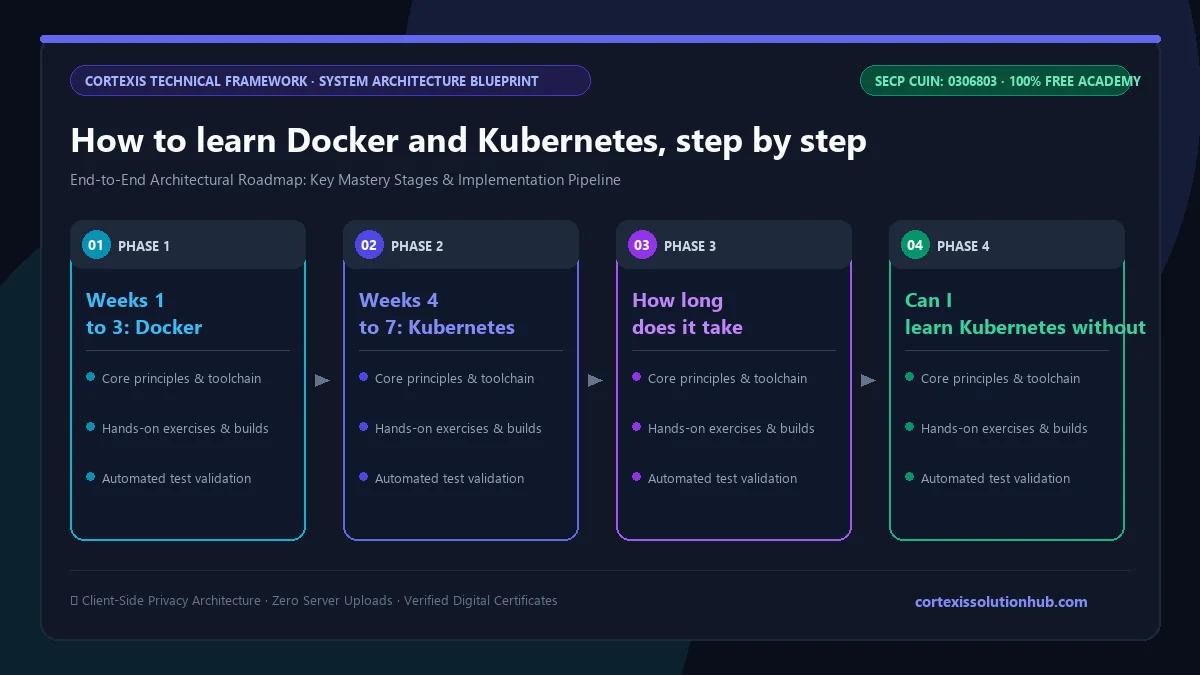
Figure 1: Complete step-by-step architectural workflow and technical execution stages for How to learn Docker and Kubernetes, step by step.
Should you learn Docker before Kubernetes?
Yes. You can type Kubernetes commands without Docker, but you will not be able to debug anything. When a pod shows CrashLoopBackOff, the cause is almost always inside the container: a wrong port, a missing environment variable, a process that exits immediately. Those are Docker skills.
The honest prerequisites are smaller than people fear:
Comfort with a terminal. Changing directories, reading files, running commands, reading an error message instead of panicking at it.
One application you understand. A small Node, Python or PHP API is perfect. Containerising your own code teaches far more than containerising a sample.
Basic Git. You will keep Dockerfiles and manifests in a repository. If that is new, do the free Git & GitHub course first, it is a short detour.
You do not need a cloud account or a powerful machine. A laptop that runs Docker comfortably is enough for the whole plan.
How to learn Docker and Kubernetes: a 7 week plan
The course is set at 7 weeks, from beginner to intermediate, and the plan below matches it. Roughly an hour a day, five days a week, is a realistic pace alongside a job or university.
Week
Focus
You are done when
1
Containers, images, everyday commands
You can run, stop, inspect and remove containers without looking things up
2
Dockerfiles, smaller and safer images
Your own app has a multi-stage Dockerfile that runs as a non-root user
3
Volumes, networks, Docker Compose
Your app, a database and a cache start together with one command
4
Kubernetes architecture, kubectl, a local cluster
You can create a cluster with kind or minikube and apply a manifest
5
Workloads and networking
Your app runs as a Deployment behind a Service and Ingress, and you can roll it back
6
Config, storage, health and scaling
Settings come from ConfigMaps and Secrets, probes work, and limits are set
7
Helm, CI/CD, security, troubleshooting
A pipeline builds your image and deploys it, and you can explain why a pod failed
Weeks 1 to 3: Docker until it is boring
Learn why containers exist, the commands you will use daily, and write a Dockerfile for your own project. The early mistakes are predictable:
Copying all your code before installing dependencies. Docker caches layers, so copy the dependency manifest first, install, then copy the code. Rebuilds become much faster.
Shipping build tools to production. Multi-stage builds compile in one stage and copy only the result into a small final image.
Running as root by default. It works, which is exactly why people never fix it. Add a non-root user and scan your images.
Storing data inside the container. A container is disposable. Database files belong in a volume.
Finish this stage with Docker Compose: one file that starts your API, a PostgreSQL database and Redis on a shared network where they find each other by name. It improves your daily development setup even if you never touch Kubernetes.
Weeks 4 to 7: Kubernetes on your own laptop
Learn the parts of a cluster, the control plane and the worker nodes, then create a local cluster with kind or minikube. Both give you a real Kubernetes API, so the manifests you write locally work the same way on a production cluster.
Then build up one layer at a time with the same app you containerised: a Pod, then a Deployment with several replicas, then a rolling update and a rollback, then a Service and Ingress in front of it. Then add configuration, storage, probes, limits, Helm and a pipeline.
Two pieces of advice. First, read kubectl describe and kubectl get events before searching the internet; the answer is usually printed there. Second, learn what Secrets do not do. By default they are only base64 encoded, not encrypted, so anyone who can read them in the cluster can read your passwords.
What the free course covers, chapter by chapter
The Docker & Kubernetes course has 12 chapters and 48 lessons, about eight hours of reading in total, and every lesson ends with a short quiz.
Containers From First Principles. Why containers changed deployment, containers versus virtual machines, installing Docker, and how images, layers and registries fit together.
Working With Docker Every Day. Daily commands, your first Dockerfile, environment variables, ports and logs, and debugging with exec and inspect.
Building Better Images. Layer caching, multi-stage builds, choosing base images, scanning for vulnerabilities and running as non-root.
Data, Networks and Docker Compose. Volumes and bind mounts, container DNS, multi-container apps and Compose for development.
Kubernetes Architecture and kubectl. Why orchestration is needed, the control plane and worker nodes, a local cluster with kind or minikube, and YAML manifests.
Running Workloads. Pods, Deployments and ReplicaSets, rolling updates and rollbacks, Jobs, CronJobs and DaemonSets.
Networking in Kubernetes. ClusterIP, NodePort and LoadBalancer Services, Ingress and the Gateway API, DNS, and network policies.
Configuration and Storage. ConfigMaps, Secrets and their limits, persistent volumes and claims, and StatefulSets.
Health, Resources and Scaling. Liveness, readiness and startup probes, requests and limits, the Horizontal Pod Autoscaler, and namespaces with quotas.
Packaging and Delivery. Helm charts, Kustomize overlays, image tags and pull secrets, and a CI/CD pipeline to Kubernetes.
Security and Troubleshooting. RBAC and service accounts, security contexts, troubleshooting pods, services and nodes, and events, logs and metrics.
Production and Certification. Managed Kubernetes on EKS, AKS and GKE, deploying a complete application, preparing for the CKAD exam, and careers in DevOps and platform engineering.
The complete application in the last chapter is a realistic stack: a React front end, a Node.js API, a background worker, Redis and PostgreSQL. It is a good model for the portfolio project you should build yourself.
Who this is for, and who should wait
This path suits backend and full stack developers who want to deploy their own work, students heading towards DevOps or cloud roles, and anyone preparing for the CKAD. If you are still learning to program, wait. Build and finish a couple of small apps first, perhaps with our Node.js backend course, then come back. Containers make far more sense once you have felt the pain of deploying something by hand.
If you want the wider picture of where Docker and Kubernetes sit next to Linux, CI/CD, cloud and monitoring, read our DevOps roadmap and the Cloud & DevOps Essentials course alongside this one.
How the free certificate works
Each lesson unlocks its quiz after 90 seconds of reading, and you need 70 percent to pass it. The course ends with a final exam of 50 questions in 60 minutes, and you pass with 50 out of 100 marks. You get one timed attempt; if it goes badly, a single retake opens 30 days later. Pass, and you receive a certificate with a verification code anyone can check.
Be clear about what it is. It shows you passed our exam. It is not the CKAD, which is a hands-on exam run by the Linux Foundation and the CNCF, where you solve real tasks in live clusters. The course prepares you for that exam's topics, but only the official exam gives you that credential. For employers, a public repository with a clean Dockerfile, a Compose file and working manifests will say more than any certificate. Our post on whether free online certificates are worth anything goes into this honestly.
Questions, answered
06 questions
At about an hour a day, plan on around seven weeks to reach a solid beginner to intermediate level: roughly three weeks for Docker and four for Kubernetes. Production confidence takes longer.
You can follow Kubernetes tutorials, but you will struggle to fix anything. Most failing pods fail because of something inside the container image, so learn to build and debug containers first.
No. Docker runs on an ordinary laptop, and kind or minikube give you a real Kubernetes cluster locally for free.
Yes. Kubernetes runs containers through a container runtime such as containerd, but images built with Docker follow the same open standard and run fine. Docker remains the everyday tool for building images and running local development setups.
Yes. All 48 lessons, the quizzes, the final exam and the certificate are free, with no trial or payment step.
It covers the topics the CKAD is built around and has a lesson on how the exam works. Practise the tasks in a terminal until they are fast, and check the official curriculum and handbook from the Linux Foundation before you book.
*Ready to start? The free [Docker & Kubernetes](/learn/docker-kubernetes) course begins with why containers changed deployment and takes you all the way to a complete application on Kubernetes.*