10 min read
Direct Answer: A practical DevOps roadmap for developers. Learn Linux, Docker, CI/CD, cloud, monitoring and Kubernetes in the right order, with a free course to follow.
- A practical DevOps roadmap for developers. Learn Linux, Docker, CI/CD, cloud, monitoring and Kubernetes in the right order, with a free course to follow.
- Authored by Umair with actionable, zero-fluff implementation guidance.
- Verified for immediate practical application, production workflows, and professional skill enhancement.
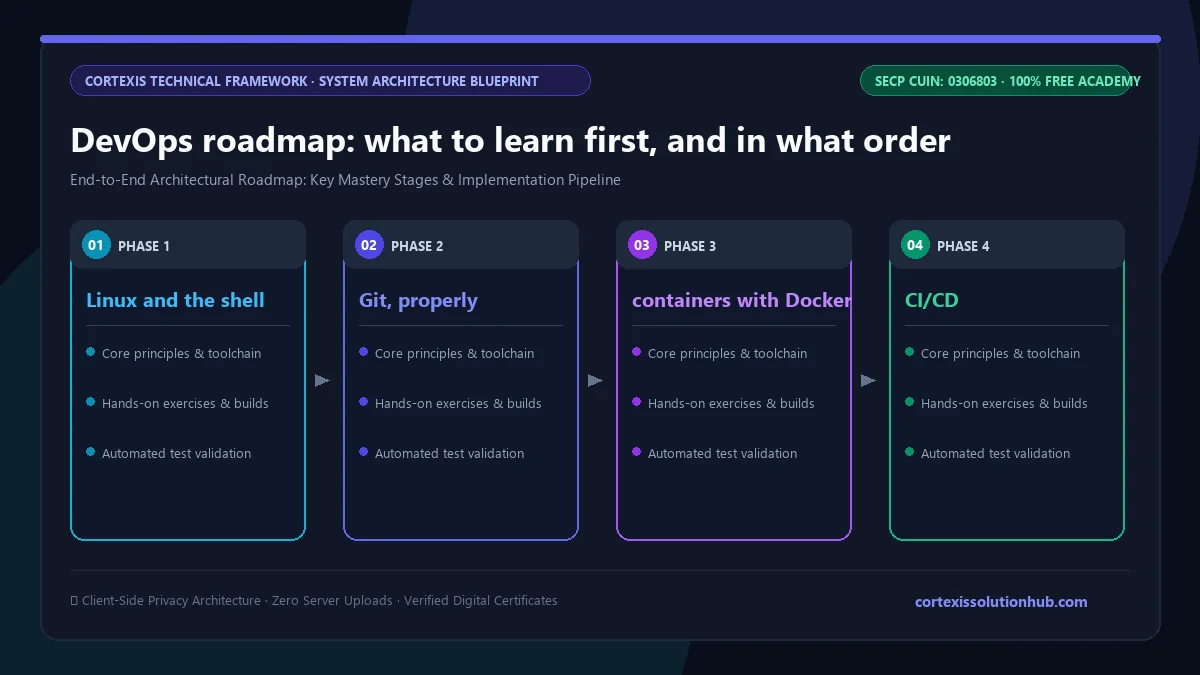
A DevOps roadmap that actually works goes in this order: Linux and the shell, then Git, then containers with Docker, then a CI/CD pipeline, then one cloud provider and infrastructure as code, then logs, metrics and rollback, and only then Kubernetes. Each step depends on the one before it. People who start with Kubernetes because it appears in every job post usually end up memorising YAML they cannot debug.
Our free Cloud & DevOps Essentials course follows the order below, so you can use this page as a map and the course as the road.
What DevOps actually is (and is not)
DevOps is not a job title you can buy a certificate for, and it is not a team that sits between developers and operations. It is a set of practices for shortening the distance between "a change exists" and "the change is safely running in front of users", while keeping the people who wrote the code responsible for how it behaves once it is live.
The single biggest idea in the practice is batch size. Ship four commits instead of four hundred and when something breaks, the cause is obvious and the rollback is one step. Almost every tool below exists to make small, frequent releases cheap and safe. The DORA research program, now part of Google Cloud, popularised four measurements for this (deployment frequency, lead time for changes, change failure rate and time to restore) and reported that speed and stability tend to improve together.
Before you start: can you build and run a small app?
You need something to deploy. If you cannot yet write a small backend and explain what happens when a request arrives, start there. Node.js Backend Development is a sensible first step, and if you are still choosing a language, our post on which programming language to learn first in Pakistan will save you from switching four times. This is why the Cloud & DevOps course is marked Intermediate: it uses a Node service as the thing you containerise, test and ship.
The DevOps roadmap, step by step
Step 1: Linux and the shell
Nearly every server you will touch runs Linux. Learn to move around the filesystem, read and change permissions, manage processes, read logs, and chain small commands with pipes. Then learn the networking you can do from a terminal: checking whether a port is open, following a DNS lookup, making an HTTP request with curl and reading the response headers.
Step 2: Git, properly
Every later step assumes your code lives in Git and that changes arrive as commits and pull requests. Branching, merging, resolving a conflict and reading history should feel routine. If they do not, take Git & GitHub before going further.
Step 3: containers with Docker
Containers solve "it works on my machine" by packaging your app with everything it needs. Learn what an image is, how Dockerfile layers and the build cache work, why a small image matters, and how volumes, networks and Docker Compose let you run an app with its database locally. Learn to push to a registry and refer to an image by its digest.
Step 4: CI/CD
A pipeline runs your tests on every push and produces an artifact you can deploy, usually a container image that never changes once built. Learn one CI system well. GitHub Actions is the easiest place to start because it sits next to your code. Learn how to keep secrets out of logs, and why trunk-based development with small merges works better than long-lived branches.
Step 5: one cloud provider and infrastructure as code
Every provider sells the same building blocks under different names: compute, storage, managed databases, networking, load balancers. Pick one provider and learn those primitives well, rather than collecting surface knowledge of three. Deploy your Node service behind a load balancer with health checks and graceful shutdown. Then describe the same setup as code, so it can be reviewed and rebuilt rather than clicked together by hand. Learn VPCs, subnets and security groups early; most "the app cannot reach the database" problems live there.
Step 6: observability and rollback
This is the step most roadmaps rush, and it is the one that separates people who can deploy from people who can be trusted with production. Learn structured logs that answer questions, metrics measured as percentiles rather than averages, and alerts that fire only when a user is actually suffering. Then learn deployment strategies that let you undo a bad release in minutes, and rehearse the rollback before you need it.
Step 7: Kubernetes
Now Kubernetes makes sense, because you already understand what it is orchestrating. Learn Pods, Deployments and Services, then resource limits and probes, which decide whether a rollout is safe. Most importantly, learn to read a Pod that refuses to start. If you want to go deeper on containers and orchestration alone, Docker & Kubernetes is a focused companion course.
Step 8 onwards: reliability at scale
After the core, the roadmap widens: supply chain security, scaling and cost, backups you have actually restored, SLOs and error budgets, on-call and incident response, GitOps and canary releases, platform engineering, performance forensics and multi-region design.
What the free course covers, chapter by chapter
Cloud & DevOps Essentials has 12 chapters of 4 lessons each, 48 lessons in total, with each lesson marked at 12 to 15 minutes of reading. It is text, commands and config, not video. Through it, you containerise a Node service, build a GitHub Actions pipeline that tests it and publishes an immutable image, provision infrastructure as code, deploy behind a load balancer, instrument it, and rehearse the rollback.
| # | Chapter | What you come away able to do |
|---|---|---|
| 1 | DevOps and the Linux Foundation | explain the practice, work in Linux, use the shell and network tools |
| 2 | Containers with Docker | write small, cache-friendly images and run multi-service apps with Compose |
| 3 | CI/CD with GitHub Actions | build a pipeline, handle config and secrets, set merge gates |
| 4 | Cloud Fundamentals and Deployment | deploy a Node app on cloud primitives and describe it as code |
| 5 | Operate It: Observability and Rollback | write useful logs, set alerts that do not cry wolf, roll back fast |
| 6 | Orchestration with Kubernetes | set resources and probes, debug a Pod that will not start |
| 7 | Harden It: Supply Chain, Scale, and Cost | secure the supply chain, survive load, plan backups and recovery |
| 8 | Reliability Engineering: SLOs, On-Call, and Incidents | use error budgets, run on-call and blameless postmortems |
| 9 | Progressive Delivery and GitOps | let the cluster pull from Git, run canaries that abort on bad metrics |
| 10 | Platform Engineering: Paved Roads for Many Teams | structure Terraform, landing zones, policy as code and golden paths |
| 11 | Performance Forensics Under Real Load | find the saturated component, profile safely, chase tail latency |
| 12 | Multi-Region Architecture and Live Migration | design for regional failure and migrate a live system without downtime |
Chapters 1 to 6 follow steps 1 to 7 above; chapters 7 to 12 are the step 8 layer most beginner courses skip.
How long a DevOps roadmap takes
The course is listed at eight weeks. That assumes you already code and can give it steady time most days. The real time goes into doing each step on a small project of your own. Aim for one working result per step: a container, a green pipeline, a live URL, then a dashboard and a rehearsed rollback. If you are starting from zero programming, add the time it takes to build that first small backend.
Mistakes that slow people down
- Starting with Kubernetes. Without Linux, networking and containers underneath, every error message is a mystery.
- Clicking instead of coding. Infrastructure built by hand in a web console cannot be reviewed, repeated or recovered. Write it as code early.
- Skipping monitoring. A deploy you cannot observe is a deploy you cannot trust. Logs, metrics and alerts are part of the job, not an extra.
- Never practising a rollback. The first time you undo a release should not be during a real incident.
How the free certificate works
Each lesson ends with a short quiz that unlocks after 90 seconds on the lesson, each chapter has its own quiz, and every quiz needs 70 percent to pass. The course ends with a final exam of 50 questions in 60 minutes, and you pass with 50 out of 100 marks. You get one timed attempt; if it does not go your way, a single retake opens 30 days later. Pass, and the certificate is issued with a verification code anyone can check.
It proves you passed our exam. It is not a cloud vendor certification and will not get you a job on its own. A public repository with a Dockerfile, a working pipeline and infrastructure code will carry far more weight. Our post on whether free online certificates are worth anything covers this without the sales pitch.
Who this DevOps roadmap is for
It suits backend and full stack developers who are tired of handing their code to someone else to deploy, students who already build projects and want to put them online properly, and support or system admin staff moving towards cloud work. It is not the right starting point if you have never written code; build a small app first, then come back.
Ready to start? Cloud & DevOps Essentials begins with what DevOps really means and the Linux you actually need, and it is free from the first lesson to the certificate.
Questions, answered
05 questions
Yes, at least the basics. You should be able to read code, run a small backend and understand what a request and response are.
Pick one and go deep. The core building blocks are the same across providers, so what you learn on one transfers to the others. If a job you want names a provider, choose that one.
No. Many teams run well on simpler platforms. Learn it after Linux, Docker, CI/CD and one cloud.
Yes. All 48 lessons, the quizzes, the final exam and the certificate are free. If you follow along on a real cloud account, the provider sets its own pricing, so check its free tier terms and set a billing alert before you create anything.
Take a small app, put it in a container, add a pipeline that tests it and publishes an image on every push, deploy it with infrastructure code, and add a health check, a dashboard and a documented rollback. Be ready to explain one failure you fixed.