10 min read
Direct Answer: How to learn Flutter step by step, from Dart basics to a signed release build. A practical roadmap, mistakes to avoid, and a free 12 chapter course.
- How to learn Flutter step by step, from Dart basics to a signed release build. A practical roadmap, mistakes to avoid, and a free 12 chapter course.
- Authored by Umair with actionable, zero-fluff implementation guidance.
- Verified for immediate practical application, production workflows, and professional skill enhancement.
If you are wondering how to learn Flutter, the short answer is this: learn enough Dart to read code comfortably, then learn widgets and layout properly, then build one small app that talks to a real API, and finish by getting a signed build onto your own phone. Most people get stuck because they skip layout and state, copy a tutorial app that never leaves the emulator, and switch to a new course every two weeks. Do the steps in order and you will have a real app sooner than you expect.
This guide gives you the roadmap, the mistakes that waste the most time, and an exact chapter by chapter look at our free Mobile App Development with Flutter course, so you can decide if it fits you before you start.
Why Flutter, and what it is good at
Flutter lets you write one Dart codebase and ship it to Android and iOS. For a solo developer or a small team, that means one set of screens and one set of bugs.
It is a strong fit for business apps, ordering and booking apps, dashboards, internal tools and anything with custom visual design. It is a weaker fit when an app is mostly native features with very little UI, like a deep camera pipeline or a wearable extension, where you will spend much of your time in Kotlin or Swift anyway.
If you are still deciding between platforms or worried about cost, we wrote about what a mobile app really costs in Pakistan and why cross platform is usually the sensible default. If your background is JavaScript and React, our React Native course may feel more familiar, and our guide on how to learn React Native compares the route. Picking one and finishing is what matters.
How to learn Flutter: the roadmap
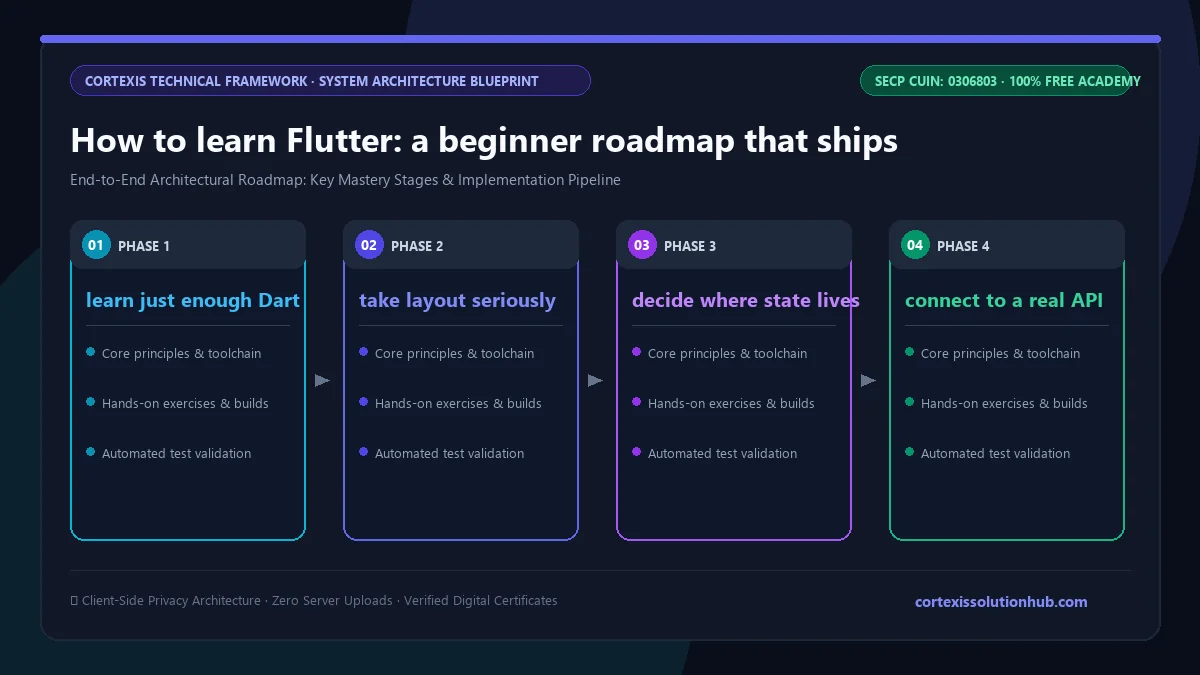
Here is the order that works, with a clear sign that you are ready for the next stage.
| Stage | What you learn | You are ready to move on when |
|---|---|---|
| 1. Dart | Variables, final and const, null safety, functions, classes, async and await | You can explain what ?, ?? and ! each do |
| 2. Widgets and layout | Stateless and stateful widgets, Row, Column, Stack, constraints, lists | You can build a screen from a screenshot without fighting overflow errors |
| 3. Navigation and state | Routes, passing data, lifting state, Provider and Riverpod basics | Two screens share data without you passing it through five constructors |
| 4. Data | HTTP, JSON parsing, forms and validation, local storage | Your app survives a slow network and a missing field in the JSON |
| 5. Release | Platform differences, testing, signing, store builds | A signed build runs on a real phone that is not yours |
| 6. Going deeper | Animation, native code, architecture, offline sync, performance, security | You have a real app with real users and a specific problem to solve |
Step 1: learn just enough Dart
Dart is a small language. If you know JavaScript, Java or C#, most of it will look familiar quickly. The part to learn carefully is sound null safety. Every ! you write is a promise to the compiler that a value is not null, and beginners scatter them to silence errors. That turns a compile error into a crash on a user's phone. Learn Future, async and await early as well, because every network call depends on them.
Step 2: take layout seriously
The single idea behind Flutter layout is that constraints go down, sizes go up, and the parent decides position. Once that clicks, the yellow and black overflow stripes stop being a mystery. Rebuild three screens from apps you use every day, a login screen, a list with images, a profile page, until you can do it without guessing.
Step 3: decide where state lives
Start with setState and get comfortable with it. Then build something where two screens need the same data, like a cart, and feel why lifting state up gets painful. That pain is what Provider and Riverpod solve. Learning a state management package before you have felt the problem is why so many beginners find it confusing.
Step 4: connect to a real API
Pick a free public API and build a list screen with a detail screen. Parse the JSON into proper Dart classes, show loading and error states, cache the last result on the device, and add one form with validation. This one app teaches more than ten tutorial clones.
Step 5: ship it to a real phone
Build a release version, sign it, and install it on a friend's phone. Release builds behave differently from debug builds, and a cheap Android phone behaves differently from an emulator on a fast laptop. Put the code on GitHub as you go; if Git is new to you, our free Git and GitHub course covers it.
Common mistakes when learning Flutter
- Watching instead of typing. Type it, break it, fix it.
- Overusing the
!operator. It hides real null cases until a user hits them. - Putting everything in one giant widget. Split screens into small widgets early. It makes rebuilds cheaper and code easier to read.
- Choosing a state management package first. Learn
setStateand lifting state, then pick Provider or Riverpod when you need it. - Never testing on a real, low end device. Smooth on an emulator does not mean smooth on the phone your users actually own.
- Ignoring the release process until the end. Signing, app icons, permissions and store listings take time. Try a release build early.
What the free Flutter course covers
The Mobile App Development with Flutter course is written, not video, and is labelled beginner to intermediate.
There are 12 chapters with 4 topics each, 48 topics in total, adding up to roughly 11 hours of reading. The course page suggests 8 weeks at a steady pace.
| Chapter | What it covers |
|---|---|
| 1. Dart and the Widget Mindset | Dart essentials, futures, async and await, streams, everything is a widget, records, patterns and switch expressions |
| 2. Stateful Widgets and Layout | Stateless versus stateful widgets, Row, Column and Flex, constraints, Stack and sizing, scrolling lists, grids and slivers |
| 3. Navigation and State Management | Navigation and routing, setState and lifting state, Provider and an introduction to Riverpod, tabs, bottom navigation and nested navigators |
| 4. Data: Networking, Forms, and Storage | HTTP and JSON parsing, forms and validation, local persistence, authenticated requests and token refresh |
| 5. Platform, Performance, and Release | Platform differences and adaptive UI, performance and testing, building and releasing, accessibility and localisation |
| 6. Animation and Native Integration | Animation that feels native, platform channels and plugins, push notifications and deep links, gestures and custom painting |
| 7. Architecture, Observability, and CI/CD | Structuring an app that grows, debugging what you cannot reproduce, flavors and a release pipeline, analytics |
| 8. Testing Beyond the Happy Path | Fakes, mocks and controllable time, widget tests for async and failure states, golden files, integration tests on real devices |
| 9. Offline-First Data and Background Work | A local database as the source of truth, optimistic writes and an outbox queue, sync and conflicts, background tasks and battery |
| 10. Performance Engineering on Real Devices | Hunting jank frame by frame, cold start, isolates, memory pressure and app size |
| 11. Security, Privacy, and Platform Trust | What an attacker gets from your binary, certificate pinning, device integrity and biometrics, permissions and data safety |
| 12. Life After Release | Migrating local schemas, API contracts for clients you cannot recall, remote config and forced upgrades, upgrading Flutter and dependencies |
Be honest about the shape of it. Chapters 1 to 5 are the core that takes you from nothing to a released app. Chapters 6 to 12 are the material that working Flutter developers usually learn on the job. Take those slowly, and come back to them when you hit the problem they describe.
Who it is for, and how long it takes
It suits students who want a portfolio app, web developers adding mobile, freelancers who keep getting asked for "an app too", and developers moving onto a Flutter team.
If you have never programmed at all, start with a few weeks of basic programming first. The course teaches Dart from the beginning, but it assumes you know what a variable, a loop and a function are. Our Python Development course is a gentle way to get there.
On time: the reading is about 11 hours, but reading is not the work. With an hour a day, including typing the examples and building your own small app alongside, the 8 week estimate is realistic for the core chapters.
How the quizzes and free certificate work
Each topic has a minimum reading time of 90 seconds before its quiz opens, and you need 70 percent on that quiz to unlock the next topic. Each chapter ends with a quiz you must pass to open the next chapter, and the final exam opens once every chapter quiz is passed.
The certificate comes from the final exam: 50 questions, 60 minutes, one timed attempt, and you pass with 50 out of 100 marks. If you do not pass, a retake opens 30 days later with the questions and options reshuffled. Pass, and you get a free certificate with a verification code and a QR code anyone can check. Be realistic about it, though: an employer will be far more impressed by an app they can install than by any certificate, ours included. We wrote more about that in are free online certificates worth anything.
Ready to start? Open the free Flutter course, install the Flutter SDK today, and get the starter app running on your own phone before you close the tab.
Questions, answered
05 questions
Yes, if you already know basic programming. Dart is small and readable, hot reload shows your changes almost instantly, and you see a working screen early, which keeps motivation up. Layout and state are the parts that take real practice.
You need the basics: variables, null safety, functions, classes and async code. You do not need to master Dart first. Learn enough to read Flutter code, then pick up the rest while you build.
With steady daily practice, most people can build and release a simple app with a list, a detail screen, an API and a form within a couple of months. Being comfortable with architecture, testing and performance takes longer and usually comes from real projects.
You can write and test the Android version on Windows. Building and signing the iOS version requires a Mac with Xcode, either your own or a cloud build service.
Yes. The lessons, quizzes, final exam and certificate are all free. You need an account to track your progress and sit the exam.