10 min read
Direct Answer: How to learn C++ for beginners without drowning in old habits. A modern C++ roadmap, mistakes to avoid, and a free 12 chapter course with a certificate.
- How to learn C++ for beginners without drowning in old habits. A modern C++ roadmap, mistakes to avoid, and a free 12 chapter course with a certificate.
- Authored by Umair with actionable, zero-fluff implementation guidance.
- Verified for immediate practical application, production workflows, and professional skill enhancement.
If you want to know how to learn C++ for beginners, here is the short answer: learn modern C++ (C++17 and C++20), not the C with classes style that many old tutorials and exam papers still use. Install one real compiler, write small programs every day, and learn the ownership model early: who creates an object, who destroys it, and when. Most of what makes C++ hard comes back to that one question, and learning it early makes everything after it easier.
This guide gives you a realistic roadmap, the mistakes that waste most beginners' time, and an exact chapter by chapter look at our free C++ Development course, so you can decide whether it fits you before you sign up.
Why C++ feels hard, and why it is worth it anyway
C++ hands you direct control over memory. Python and JavaScript clean up after you; C++ asks you to decide. That control is why it runs game engines, browsers, databases and embedded devices, and why a small mistake can crash a program in ways that are hard to reproduce.
Most of the pain beginners feel is not the language itself. It is learning from material written before modern C++ existed. If your notes are full of new, delete, raw arrays and char* strings, you are learning the hard, error prone version first. Modern C++ gives you std::vector, std::string, std::unique_ptr and RAII, and with those, whole categories of bugs simply stop happening.
If you are a BSCS or BSSE student in Pakistan, your first programming courses very often use C++. We wrote about that situation in which programming language you should learn first: do the syllabus language properly. This guide is about doing it properly.
How to learn C++ for beginners: the roadmap
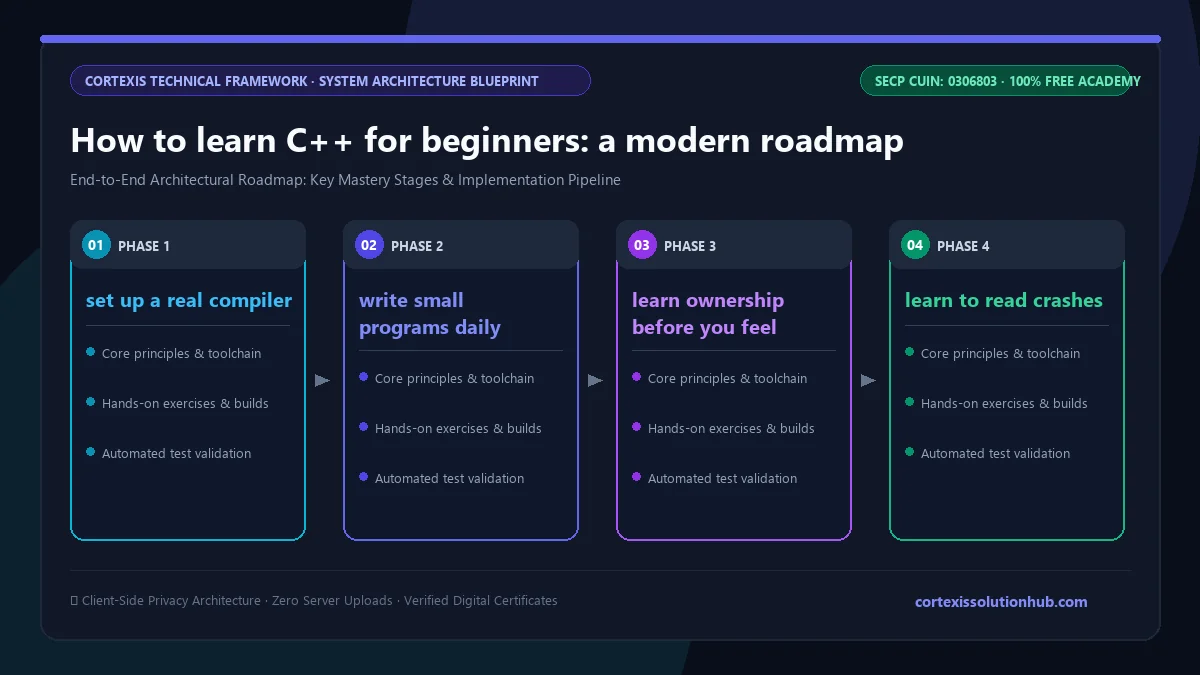
Here is the order that works, with a rough sense of what "done" looks like at each stage.
| Stage | What you learn | You are ready to move on when |
|---|---|---|
| 1. The basics | Types, brace initialisation, references, const, functions, headers | You can split a program across two .cpp files and a header without linker errors |
| 2. Classes and lifetime | Constructors, destructors, RAII, the Rule of Zero, virtual functions | You can write a class that owns a file and closes it on every exit path |
| 3. Ownership | unique_ptr, shared_ptr, weak_ptr, string_view, span | You can say who owns every object in your program |
| 4. The STL | vector, map, iterators, algorithms, move semantics, optional and variant | You reach for an algorithm before you write a raw loop |
| 5. Real projects | Templates, exceptions, CMake, tests, a debugger and sanitizers | Someone else can clone your repo and build it with one command |
| 6. Going deeper | Concurrency, memory layout, coroutines, libraries | You have a specific reason, a job or a project, that needs it |
Step 1: set up a real compiler
On Windows, Visual Studio Community or g++ through MSYS2 both work. On Linux, install g++ or clang from your package manager. On a Mac, the Xcode command line tools give you clang. Compile with warnings on (-Wall -Wextra on g++ and clang) and treat every warning as a bug report, because in C++ it usually is one.
Step 2: write small programs daily
Thirty focused minutes every day beats a five hour Sunday. Good early programs: a grade calculator that reads from a file, a word frequency counter using std::map, a bank account class.
Step 3: learn ownership before you feel ready
Do not wait until "advanced" to learn smart pointers and RAII. They are the beginner topics in modern C++. A std::unique_ptr makes "who deletes this?" a question the compiler answers for you.
Step 4: learn to read crashes
Use a debugger from week one, and build with AddressSanitizer (-fsanitize=address,undefined with g++ or clang on Linux or Mac; Visual Studio has its own /fsanitize=address option) when something behaves strangely. A sanitizer turns a mysterious crash three functions away into a clear message pointing at the exact line that read freed memory.
Step 5: build one project with CMake and tests
Once you can write classes and use the STL, put a project into CMake, add a few tests, and push it to GitHub. If you have not used Git yet, our free Git and GitHub course covers it.
Common mistakes that slow beginners down
- Learning from pre 2011 material. If a tutorial uses
newanddeletein its first example of a class, close it. - Using
using namespace std;in headers. It quietly drags every standard name into every file that includes yours. - Ignoring compiler warnings. An uninitialised variable warning is a crash waiting for a different input.
- Returning references to local variables. The local is destroyed when the function ends, and the reference now points at nothing. This is the classic dangling reference.
- Keeping an iterator after modifying a vector. Adding to a
std::vectorcan move its storage, which invalidates iterators and pointers into it. - Using
shared_ptreverywhere "to be safe". Shared ownership is the exception, not the default, and two objects that holdshared_ptrs to each other leak forever.
What the free C++ Development course covers
The C++ Development course is written, not video, and is labelled beginner to intermediate. It teaches modern C++17/20 with a focus on the ownership and lifetime model, and each chapter ends with you able to spot a specific class of real bug: double frees, dangling references, invalidated iterators, silent copies and reference cycles.
There are 12 chapters with 4 topics each, 48 topics in total, adding up to roughly 11 hours of reading time. The course page suggests 8 weeks at a steady pace.
| Chapter | What it covers |
|---|---|
| 1. The C++ Mental Model | Values and initialisation, references, pointers and const, functions and overloading, headers and the One Definition Rule |
| 2. Classes, RAII, and Lifetime | Constructors, RAII, the Rule of Zero, Three and Five, inheritance, virtual functions and slicing |
| 3. Memory and Ownership | The free store and why you stop using raw new, unique_ptr, shared_ptr and weak_ptr, string_view and span |
| 4. The STL and Move Semantics | Choosing containers, iterators and algorithms, move semantics and value categories, optional, variant and tuple |
| 5. Generic Code, Errors, and Builds | Templates, exceptions and their alternatives, CMake, variadic templates and perfect forwarding |
| 6. Concurrency Without Data Races | Threads and data races, mutexes and deadlock, atomics and futures, latches, barriers and semaphores |
| 7. Debugging, Testing, and Performance | Debuggers and sanitizers, GoogleTest and CTest, profiling before optimising, fuzzing and property based tests |
| 8. Memory Layout and Custom Allocation | Alignment and padding, arenas and pools, std::pmr, cache lines and vectorised loops |
| 9. Lock-Free Code and the Memory Model | Acquire and release, compare and swap, the ABA problem, and when a mutex wins |
| 10. Coroutines and Asynchronous C++ | Coroutine frames and promises, generators, tasks and non blocking I/O, cancellation and lifetimes |
| 11. Libraries, ABI, and Distribution | Compilers and the portable subset, static and shared libraries, ABI breakage, packaging and cross compiling |
| 12. Memory Safety, Hardening, and Legacy Code | Untrusted input, hardened builds and static analysis, modernising old code safely, living beside Rust |
Be honest with yourself about the second half. Chapters 1 to 7 are the core that every C++ developer uses. Chapters 8 to 12 go into territory that working engineers often learn on the job, and it is fine to take them slowly or come back to them later.
Who this course is for, and how long it takes
It suits you if you are a CS student who wants to understand C++ properly rather than pass by memorising, a developer coming from Python or JavaScript who needs C++ for a job, someone heading towards game development (our Unity game development course is the gentler route if you only want to ship games), or anyone preparing for interviews that pair C++ with data structures and algorithms.
If you have never written a line of code in any language, it will feel steep. It starts from types and initialisation, but it moves at the pace of someone who knows what a loop and a function are. Two or three weeks of basic programming first will make it far smoother.
On time: the reading is about 11 hours, but reading is not learning. Type every example into your own compiler and break it on purpose. With an hour a day, the 8 week estimate is realistic for the core, and longer if you build a project alongside, which you should.
How the quizzes and free certificate work
Each topic has a minimum reading time of 90 seconds before its quiz opens, and you need 70 percent on that quiz to unlock the next topic. Each chapter also ends with a quiz you must pass at 70 percent to open the next chapter, and the final exam opens only after every chapter quiz is passed. A failed quiz tells you which questions you got wrong, but not the answers, so you go back and reread.
The certificate comes from the final exam: 50 questions, 60 minutes, one timed attempt, and you pass with 50 out of 100 marks. If you do not pass, one retake opens 30 days later with the questions and options reshuffled. Pass, and you get a free certificate with a verification code and a QR code anyone can check. We wrote honestly about what that paper is worth in are free online certificates worth anything.
Ready to start? Open the free C++ Development course, install a compiler today, and write your first small program before you close the tab.
Questions, answered
05 questions
It is harder than Python as a first language, but it teaches you how memory and programs actually work. If your degree uses it, or you want games, systems or performance work, starting with modern C++ is a sound choice.
The core language, classes, ownership and the STL, takes most people a few months of steady daily practice. Being comfortable with concurrency, templates and large codebases takes longer and usually comes with real project work.
No. Learning C first tends to build habits, raw pointers and manual memory management, that modern C++ deliberately replaces. Start with modern C++ directly.
Learn C++17 and C++20. Current versions of GCC, Clang and Visual Studio support C++17 fully and most of C++20. These are the versions modern codebases are moving to, and they include the features that make the language safer to write.
Yes. The lessons, quizzes, final exam and certificate are all free. You need an account to track progress and sit the exam.