10 min read
Direct Answer: A practical frontend developer roadmap. Learn HTML, CSS, JavaScript, Git, React, testing and performance in the right order, with a free course to follow.
- A practical frontend developer roadmap. Learn HTML, CSS, JavaScript, Git, React, testing and performance in the right order, with a free course to follow.
- Authored by Umair with actionable, zero-fluff implementation guidance.
- Verified for immediate practical application, production workflows, and professional skill enhancement.
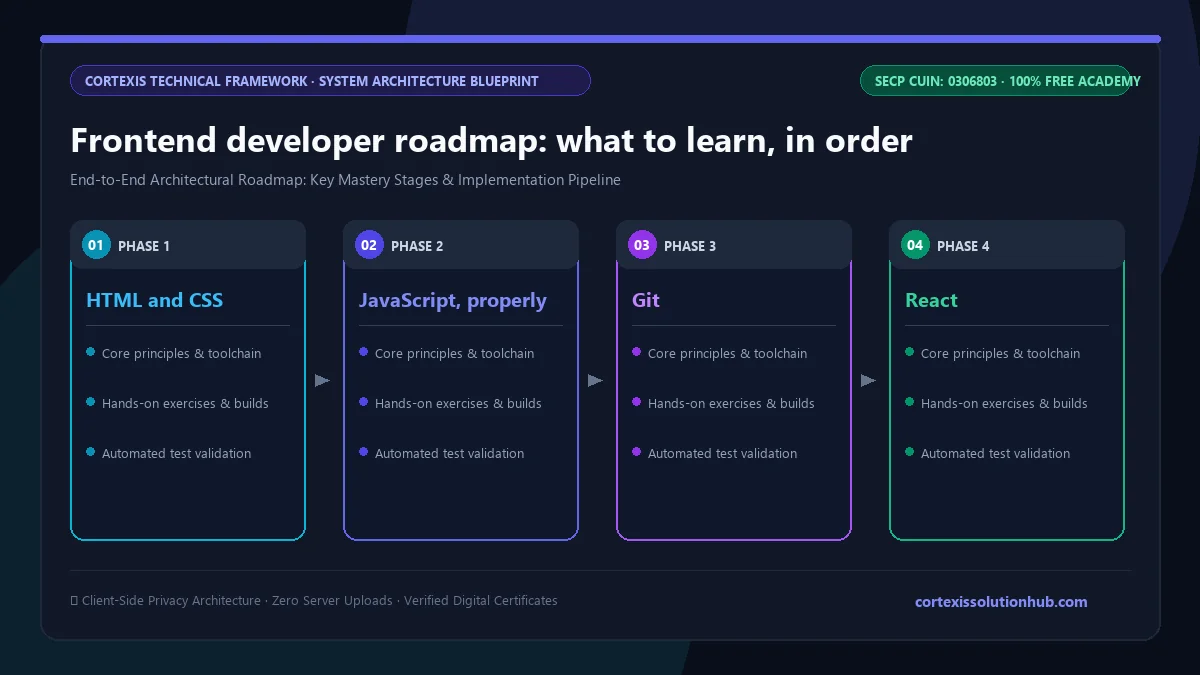
A frontend developer roadmap that works goes in this order: HTML and CSS until you can build a page from a screenshot, then JavaScript properly, then Git, then one framework (React is the safe choice), then forms, accessibility and testing, then performance and shipping to production. TypeScript, design systems and server rendering come after you have built and deployed real things. Skipping ahead is the most common reason people spend a year "learning React" and still cannot build a working signup form.
Most roadmap charts online show dozens of logos with arrows between them. This page tells you which ones matter now. Our free Frontend Engineering course covers the React half of the road in detail, so you can use this article as the map and the course as the road.
What a frontend developer actually does
A frontend developer builds the part of a product that people touch: the pages, buttons, forms, menus and loading states. The job is less about making things pretty and more about making them correct. Does the form keep the user's input when the network fails? Can someone use the menu with a keyboard? The hard part is building something a team can change for years without breaking it.
The frontend developer roadmap, step by step
Here is the full order, with a rough idea of what "done" looks like at each step. The time column assumes a couple of hours most days, and it will vary a lot from person to person.
| Step | Learn | You are ready to move on when | Rough time |
|---|---|---|---|
| 1 | HTML and CSS | You can rebuild a simple landing page from a screenshot, and it works on a phone | 4 to 6 weeks |
| 2 | JavaScript | You can fetch data from an API and render it, handling loading and errors | 6 to 8 weeks |
| 3 | Git and GitHub | Your projects live in repositories with small, regular commits | 1 week, then daily habit |
| 4 | React fundamentals | You can split a page into components and decide where each piece of state belongs | 3 to 4 weeks |
| 5 | Forms, accessibility, testing | Your forms work with a keyboard and a screen reader, and you have tests that survive a refactor | 3 to 4 weeks |
| 6 | Performance and production | You can measure why a page is slow and deploy with environments and error handling | 2 to 3 weeks |
| 7 | TypeScript, design systems, server rendering | You are working on a team codebase, or building for one | Ongoing |
Step 1: HTML and CSS
Learn semantic HTML first: headings, lists, buttons that are real <button> elements, labels attached to inputs. Many accessibility problems in real apps come from a <div> pretending to be a button. Then learn CSS layout properly, meaning Flexbox, Grid, and how the cascade decides which rule wins. A UI framework hides weak CSS; it does not fix it.
Step 2: JavaScript, properly
This is the step people rush, and it costs them later. Before React, you should be comfortable with functions, arrays and objects, map and filter, async and await, promises, and how closures capture variables. Many React bugs are really JavaScript bugs: a stale value captured in a closure, an object mutated in place, a falsy 0 rendered on screen. If you want a quick check of where you stand, try our JavaScript output questions.
Step 3: Git
Learn Git early, before your code is worth losing. Commit small, write messages that say why, and push to GitHub. Recruiters and reviewers often look at commit history, and a repository with commits spread across weeks tells a better story than one giant upload. Our free Git & GitHub course covers the workflow.
Step 4: React
Pick one framework and stay with it; React is the safe choice and the one our course uses. The goal here is not to memorise hooks. It is to understand what a component is, why render must be pure, and where state should live.
What the free Frontend Engineering course covers
The course is 12 chapters and 48 lessons, each lesson roughly 12 to 15 minutes of reading with code. It is labelled Beginner to Intermediate and planned for about 8 weeks. It starts at React, not at HTML, so it assumes you already have steps 1 to 3 behind you.
| Chapter | What you learn |
|---|---|
| 1. Component Architecture | The rendering contract, composition over configuration, where state lives, prop APIs and forwarded refs |
| 2. Hooks in Depth | useState and batching, useReducer, useEffect dependencies, cleanup and races, refs, custom hooks, useId and useSyncExternalStore |
| 3. State Management and Routing | Client state versus server state, context without re-render storms, React Router, optimistic updates and cache invalidation |
| 4. Performance | Why React re-renders, when memo, useMemo and useCallback help and when they do nothing, code splitting, list virtualisation, moving work off the main thread |
| 5. Forms, Accessibility, and Testing | Validation, accessible components, React Testing Library, wizards, field arrays and file uploads |
| 6. Shipping to Production | Error boundaries, builds and environment variables, source maps, Core Web Vitals, release pipelines, feature flags and rollback |
| 7. Security and Debugging | XSS and trusted output, auth tokens, cookies and CORS, debugging bugs you cannot reproduce, dependency and supply chain risk |
| 8. TypeScript in React | Typing props, state and events, discriminated unions, generic components, types at the API boundary |
| 9. Test Strategy and Automation | Choosing what to test, Playwright end to end tests, flaky tests and test data, visual regression and automated accessibility checks |
| 10. Design Systems and Component Libraries | Styling architecture, design tokens and dark mode, headless dialogs, menus and comboboxes, publishing and versioning a package |
| 11. Server Rendering and Streaming | When to render on the server, hydration mismatch bugs, streaming with Suspense, Server Components and Actions |
| 12. Frontend Architecture at Scale | Monorepos and build caching, micro-frontends and when they are not worth it, incremental migration and codemods, performance budgets |
Each chapter is built around a class of real bug, such as the stale closure or the context that re-renders the whole tree, so you finish able to diagnose it.
Common mistakes on the frontend roadmap
- Starting with a framework. React on shaky JavaScript feels like magic until something breaks. Spend the extra weeks on step 2.
- Collecting tutorials instead of finishing projects. Ten half built clones are worth less than one finished app with a login, a form, error states and a live URL.
- Ignoring accessibility. It is not an optional extra. Keyboard support and proper labels are basic correctness, and many teams check for them in review.
- Memoising everything. Wrapping every component in
memodoes not make an app fast. Measure first with the React profiler, then fix the one thing that is actually slow. - Putting everything in global state. Most state belongs close to the component that uses it. Data from the server is a cache, not app state, and should be treated like one.
- Testing implementation details. Tests that check class names or internal state break on every refactor. Test what the user sees and does.
A first project that proves you can do the job
Build a small app with real data, for example a course catalogue, an expense tracker or a recipe search. It should have a list page and a detail page with routes, a search or filter stored in the URL, a form with validation that works with a keyboard, proper loading, empty and error states, at least a few tests written with React Testing Library, and a live deployment. Add a README explaining one bug you hit and how you fixed it.
If you are aiming at jobs here, our guide to which programming language to learn first in Pakistan explains why JavaScript and React show up so often in local job posts.
Who this roadmap and course are for
The roadmap suits anyone starting web development from zero. The course itself suits people who already know HTML, CSS and JavaScript and have built something small, and now want to write React the way working teams do.
If you are starting from nothing, begin with Full Stack Web Development, which starts at raw HTML, and come back once you can build a page with JavaScript. If you want stronger types after chapter 8, the TypeScript course goes further.
How long it takes and how the free certificate works
The course is planned for 8 weeks at a steady pace. The full roadmap from zero to a junior level portfolio takes many months, and depends more on projects finished than hours watched.
Each lesson ends with a short quiz, which unlocks after 90 seconds on the lesson, and you need 70 percent to pass it. The course ends with a final exam of 50 questions in 60 minutes, and you pass with 50 out of 100 marks. You get one timed attempt; if it does not go your way, a single retake opens 30 days later. Pass, and the certificate is issued with a verification code anyone can check.
Be honest with yourself about what it means. It proves you passed our exam. It will not get you a job on its own; a deployed project and a clean GitHub history will carry more weight. Our post on whether free online certificates are worth anything covers this without the sales pitch.
Ready to start? Frontend Engineering begins with what a React component actually is and where state belongs, and it is free from the first lesson to the certificate.
Questions, answered
05 questions
HTML and CSS first, then JavaScript, then Git, then one framework such as React. After that, learn forms, accessibility, testing and performance. Leave TypeScript, design systems and server rendering until you have built and deployed a few real projects.
Yes. React is JavaScript, and most React bugs are JavaScript bugs in disguise. Get comfortable with functions, arrays, objects, closures and `async` code first.
Not on day one. Learn plain JavaScript first so you understand what TypeScript is protecting you from. Once you have built a React app or two, add TypeScript; the course teaches it in chapter 8 for exactly that reason.
Yes. All 48 lessons, the quizzes, the final exam and the certificate are free. There is no paid tier hidden behind the later chapters.
Unlikely on its own. Employers look at what you have built. A live app with routing, forms, tests and sensible error handling, plus a repository with steady commits, will do much more for you than any certificate, ours included.