7 min read
Direct Answer: How to type faster without losing accuracy. Fix posture and the home row, slow down to stop errors, then push your speed with a pacer. A free 4 week plan.
- How to type faster without losing accuracy. Fix posture and the home row, slow down to stop errors, then push your speed with a pacer. A free 4 week plan.
- Authored by Umair with actionable, zero-fluff implementation guidance.
- Verified for immediate practical application, production workflows, and professional skill enhancement.
To type faster, slow down first. Get your fingers on the home row, stop looking at the keyboard, and practise at a pace where you make almost no mistakes. Then raise the pace a little at a time. Speed is what accuracy turns into after enough repetition, and almost everyone who stays stuck at the same speed is trying to force it the other way round.
This guide gives you a simple 4 week plan to type faster and more accurately, answers the questions people ask most about typing speed, and shows how to turn daily practice into something you actually want to do, using our free typing race TypeDash.
Accuracy first, speed second
Every mistake costs you three things: the wrong key, the backspace, and the moment it takes to find your rhythm again. That is why someone typing steadily with no errors often finishes ahead of someone who types in fast bursts and keeps correcting.
There is a second reason. When you type a word correctly many times, your fingers learn it as one movement instead of separate letters. When you type it wrong half the time, they learn the mistake too. Slow, clean repetitions build the right habit. Fast, sloppy ones build the wrong one.
A good rule: if you are making more than a few mistakes per passage, you are going too fast for where you are right now.
Set up before you speed up
Two minutes of setup makes every practice session count for more.
- Sit square to the keyboard. Feet flat, shoulders relaxed, elbows bent at roughly a right angle, wrists floating rather than bent up (see the Mayo Clinic Office Ergonomics Guide for healthy wrist and forearm alignment).
- Find the home row. Left fingers rest on A, S, D and F, right fingers on J, K, L and the semicolon. Feel for the small bumps on F and J. Each finger reaches up and down from its home key and comes back.
- Use both thumbs for space. Or pick one and stay consistent.
- Stop looking down. This is the hardest habit to break and the one that matters most. If you have to, cover your hands with a cloth for the first week.
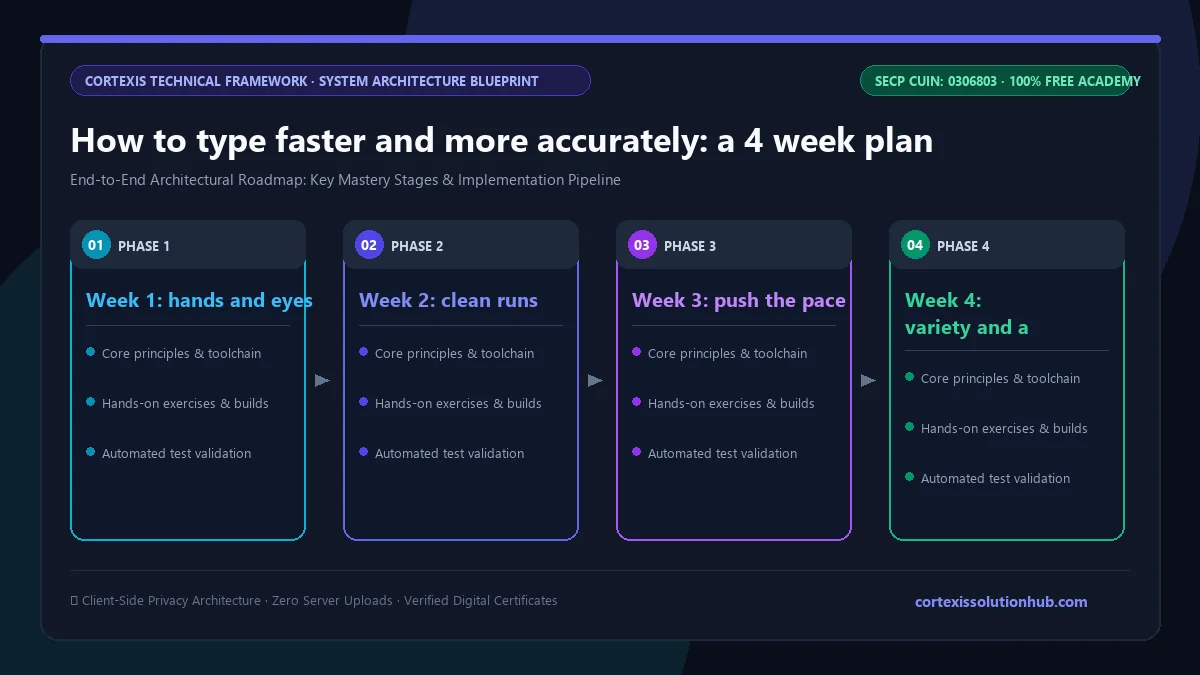
A 4 week plan to type faster
Practise for 15 to 20 minutes a day, five or six days a week. Short daily sessions work far better than one long session at the weekend.
| Week | Daily Goal | Focus Area | Target Accuracy | Suggested Mode |
|---|---|---|---|---|
| Week 1 | 15 mins | Home row muscle memory & screen focus | 95%+ | Solo practice (35 WPM pacer) |
| Week 2 | 20 mins | Zero-error runs & combo maintenance | 98%+ | Solo practice (clean passages) |
| Week 3 | 20 mins | Pace acceleration & live room pressure | 96%+ | 50–70 WPM pacer + 1 Live Race |
| Week 4 | 20 mins | Numbers, symbols & daily challenge | 97%+ | Daily Challenge + Code mode |
Week 1: hands and eyes
Focus only on the home row and not looking at the keys. Type slowly. Your speed will probably drop at first, especially if you used to type with two or three fingers. That is normal and it is temporary. In TypeDash, use practice mode with the pacer set to its lowest speed, 35 words per minute, and simply try to stay with it without errors.
Week 2: clean runs
Aim for whole passages with no mistakes at all. When you make one, finish the passage, then do the same passage again. The combo counter in TypeDash is a useful guide: it grows with every correct key and resets on a single error, so a long combo means you are typing cleanly.
Week 3: push the pace
Once clean runs feel normal, start racing a pacer set slightly above your comfortable speed. Stay close to it for the whole passage. If your accuracy falls apart, drop the pacer back by five words per minute. Add one live race a day against other players, which brings a little pressure into your practice.
Week 4: variety and a daily habit
Mix in harder material: longer passages, punctuation, and the numbers and symbols mode. Play the daily challenge, the same passage for everyone each day, where only your first finished run counts. It is a good test of how you type when you get one attempt, just like real work.
After week 4, keep the streak going. In TypeDash every day in a row adds 5 percent to the points you earn, up to 50 percent, and practice runs count towards it.
How to type faster when you already type fast
If you already type well, gains come from different places:
- Find your weak keys. Notice which letters or symbols make you hesitate and practise passages that use them.
- Read ahead. Keep your eyes a word or two ahead of your fingers, so you are never waiting to see what comes next.
- Race your own ghost. TypeDash keeps a replay of your best run on each passage. Racing it shows you exactly where you were faster last time.
- Practise what you actually type. Programmers should train on real code, which is full of brackets and symbols. Our guide to typing practice for programmers covers this.
Does a mechanical keyboard make you type faster?
A keyboard you like can make typing more comfortable, and comfort helps you practise more. But no keyboard fixes technique. Someone with good habits types well on any keyboard, including a laptop. Spend your effort on practice before you spend money on hardware.
Practise with a pacer and other people
Typing drills are easy to quit. Racing is not. TypeDash is a free multiplayer typing game where up to five racers type the same passage live, with combos, a nitro boost for flawless words, and golden words worth a bonus. When nobody is online, practice mode starts in seconds against a pacer, the ghost of the world record, or your own best run. Passages come in seven languages.
You can also start a typing race with friends using a private room, which is a fun way to keep each other practising. For a different kind of challenge, see our other free coding games.
Questions, answered
05 questions
Most people notice a real difference within a few weeks of short daily practice. Switching from looking at the keys to touch typing usually makes you slower for the first week or two before you overtake your old speed.
Practise at a pace slow enough to make almost no mistakes, then raise the pace in small steps. Accuracy is what makes speed possible, because every error costs you a correction and your rhythm.
Learn the home row first, keep your eyes off the keyboard, and practise for 15 to 20 minutes a day. A typing game with a slow pacer is a good way to make daily practice stick.
For most people a full keyboard is much faster than a phone, because all ten fingers can work at once. Phone typing is a separate skill. TypeDash also works on phones if you want to practise both.
Yes, if they make you practise regularly and reward accuracy. A game with a pacer, a combo that resets on mistakes and a daily streak gives you the same practice as a drill, and you are far more likely to keep doing it.